How to fill out and sign a COBRA election form without a printer
By the PDFinish editorial team · Reviewed · Published · 5 min read
Last updated:
You can complete a PDF election form in your browser: type on the lines, tick the box you choose, sign, date and download the file. Then send it the way your election notice says, which is often by mail or email, and keep proof of the date you sent it.
A COBRA election form often arrives as a plain PDF attached to an email or a letter. You need to fill it in, sign it and send it back, and you may not own a printer or a PDF editor. This guide covers the PDF work only.
It does not tell you whether to elect COBRA, which plan to pick or what to pay. Those are questions for your plan administrator. Follow the deadlines and instructions in your own election notice, because they are the ones that apply to you.
Fill it out and sign it in four steps
These steps use Fill PDF. It runs in your browser, so the form is not uploaded.
- Open the election form in Fill PDF. Drop the PDF onto the page. If the tool says it has no fillable fields, that is normal for plain PDFs, and it lets you type on the page.
- Type your answers on the lines. Enter only what the form asks for, and tick the box for the choice you have made. Press Tab to move from one blank to the next.
- Add your signature and the date. Draw, type or upload a signature, place it on the signature line and add the date. Check the short list of spots that still look empty.
- Download the file and name it clearly, such as Election-Form-Signed.pdf. Send it the way your notice says, and keep a copy.
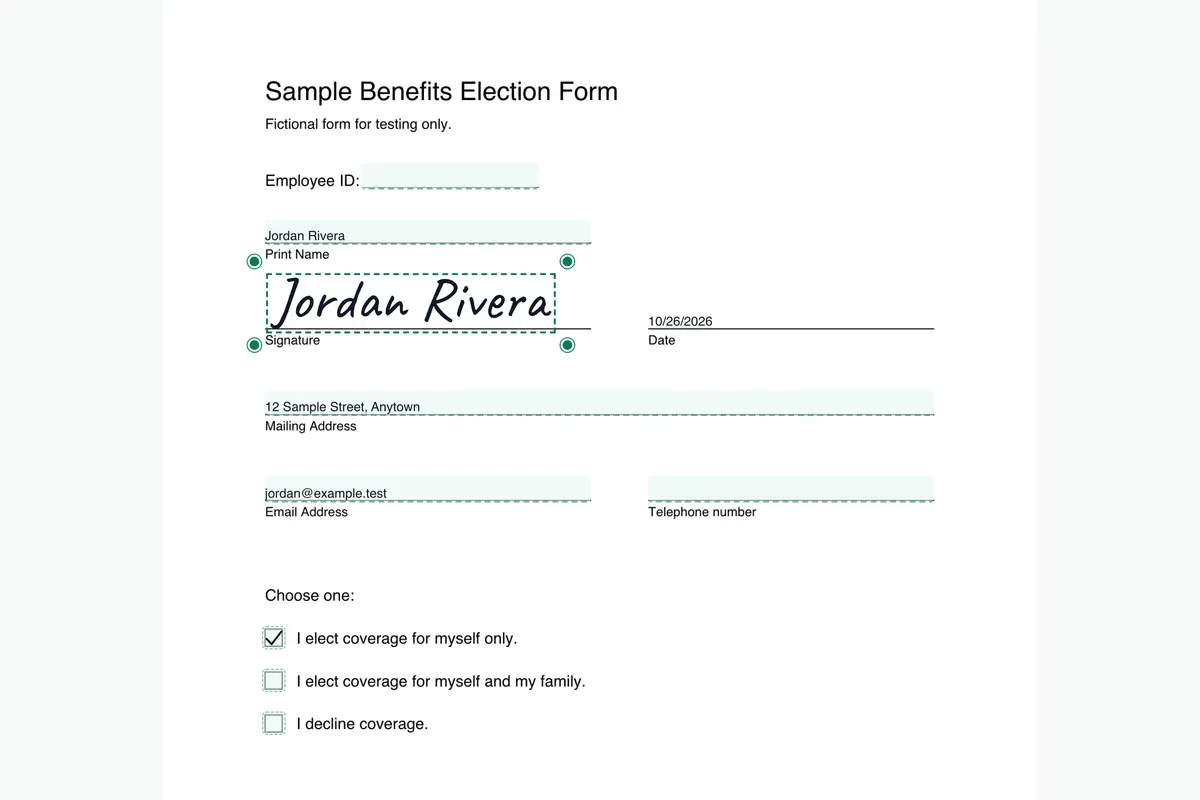
For a closer look at the first step, see how to fill out a PDF that isn't fillable.
Different companies run COBRA in different ways. If yours is on the list, see what each company says about electing, from its own public pages.
Starting from one company's paperwork? Each of these pages shows what the company says about electing: iSolved COBRA form, WEX COBRA form, Insperity COBRA form, Chard Snyder COBRA form, Benefit Resource COBRA form and AmeriFlex COBRA form.
The federal timing facts
The U.S. Department of Labor publishes plain-language pages on COBRA. These are the federal minimums, and they are not a substitute for your notice. Your election notice and plan administrator tell you your actual dates.
- Election period: workers have at least 60 days to decide whether to enroll. The 60 days begin on the later of the date the plan provides the election notice, which may be the date it is mailed, or the date coverage would otherwise be lost. Source: A Worker's Guide to Health Benefits Under COBRA.
- First payment: after you elect, plans must give you at least 45 days to make your first payment. Source: the same Department of Labor guide, and the FAQs on COBRA Continuation Health Coverage for Workers, which say you have 45 days after electing.
- Later payments: the Department of Labor FAQs say there is a 30-day grace period after each due date, except for the initial payment. Source: the same FAQs.
Those pages do not say how an election must be delivered, so this guide does not either. Follow the way your notice says to send it. If your plan does not give clear instructions, the Department of Labor suggests notifying the person or office at your job that handles benefits, such as Human Resources.
Sending it back
Look in your election notice for how to return the form. Some notices name a mailing address. Some name an email address or an online portal. Do exactly what yours says.
- By email: only if your notice allows it. Attach the downloaded PDF and send it from your own email account. PDFinish does not send the email for you.
- By mail: if your notice asks for a paper form, you may need a printed copy. Ask your plan administrator whether another way is accepted.
- By portal or another route: use the one your notice names.
Can I sign it electronically?
Ask your plan administrator and follow your notice. Fill PDF and Sign PDF place a picture of your signature on the page. That is not a certificate-based digital signature. Some plans accept a signature like that, and some ask for a handwritten one. Only your plan can tell you which.
Keep a copy and proof of the date you sent it
Keep the signed PDF in a place you will find it. Also keep a record of when you sent it, such as the sent email with its date and time, a mail receipt or a tracking number, or a screenshot of the portal's confirmation. If a question comes up later, you will have a dated record.
If you email the form, remember that it holds personal details. Send it only to the address in your notice. If you want to lock the file with a password, ask your plan administrator first whether they can open a protected file.
Is my information uploaded?
No. Fill PDF opens and fills the form in your browser, and your answers are drawn onto the page on your device. Your 2 free uses in total need no account. If you are between jobs, the job seekers page has more on the paperwork that comes with a job change.
What to double-check before you send it
- Names, addresses and any ID numbers match your notice.
- You ticked the choice you meant, and no other box in that group.
- The signature and date are on the right lines.
- You know the deadline in your notice and when you will send the form.
General information, not legal, tax or insurance advice. Check your election notice, ask your plan administrator, and see the Department of Labor's pages linked above for the federal rules.
Questions people ask
Can I fill out a COBRA election form online?
Yes, if you have it as a PDF. Open it in Fill PDF in your browser, type on the lines, tick your choice, sign, date and download the file. Then send it the way your election notice says.
Can I sign a COBRA election form electronically?
Ask your plan administrator and follow your election notice. Some plans accept a signature added to a PDF and some ask for a handwritten one.
Can I email my COBRA election form?
Only if your election notice allows it. Use the address or method your notice names, and keep a record of when you sent it.
How long do I have to elect COBRA?
The Department of Labor says workers have at least 60 days, starting on the later of the date the plan provides the election notice or the date coverage would otherwise be lost. Check the deadline in your own election notice.
Is my information uploaded when I fill the form in PDFinish?
No. The form is opened and filled in your browser, and your answers stay on your device.
Does PDFinish tell me whether to elect COBRA?
No. We only help with the PDF work. Ask your plan administrator about your choices, deadlines and costs.
Try it
- Fill PDF
Fill a PDF form, with or without fillable fields: type, tick, sign and date.
- Sign PDF
Draw or type your signature and place it on the page.
- Finish PDF
Fill, sign, lock and shrink a PDF in one guided flow, then save it.
- Fill and Sign PDF
Fill a form, tick boxes, sign it, and send it back by email or share sheet.
This article is general information, not legal or tax advice. See how we write and check guides in our editorial policy. More plain guides are on the PDFinish blog.