Create a fillable PDF
Place text boxes, checkboxes and dropdowns on a PDF to make a form.
or drop it here. PDF files up to 50 MB
Your file stays on your device. Nothing is uploaded unless you choose Email it to me.
- 2 free uses in total, no account needed
- No ads
- Nothing to install
How it works
1. Add your PDF
Choose your PDF from your device or drop it on the page.
2. Place and name the fields
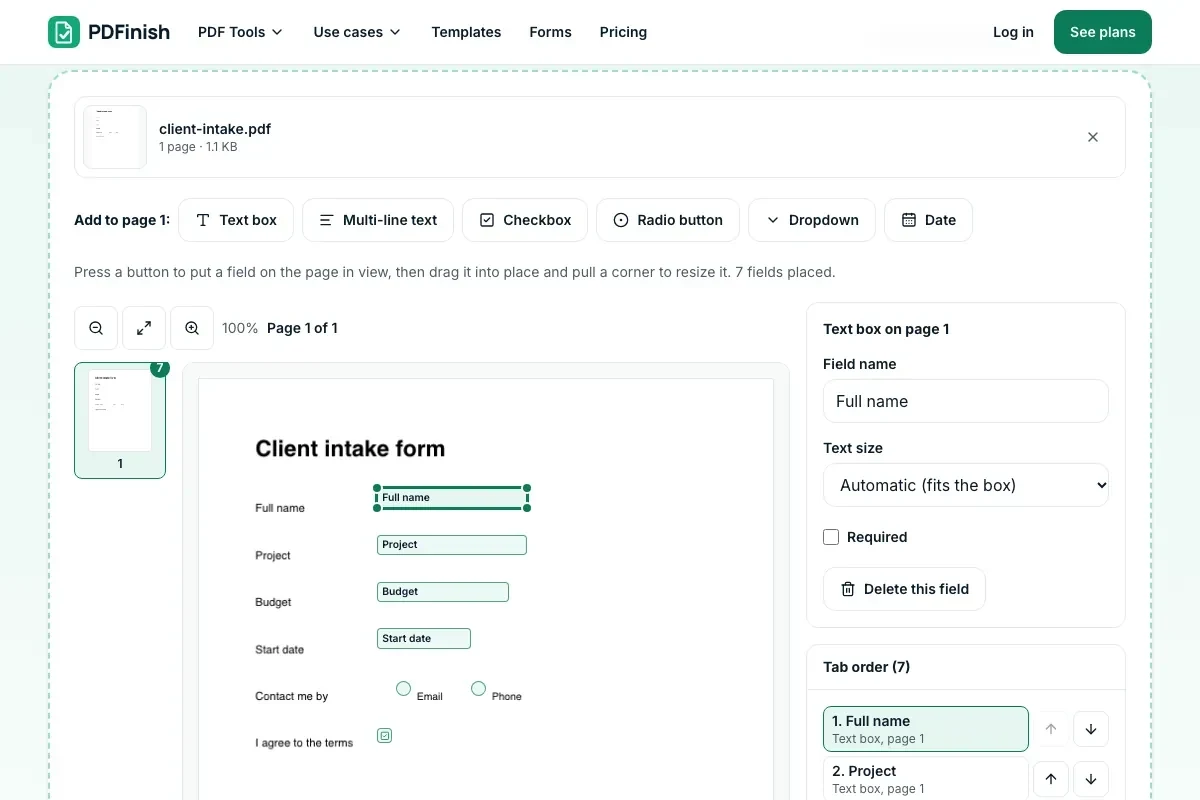
Press a field type, drag it into place, then name it.
3. Save the fillable PDF
Save the form, or try it in Fill PDF.
What you can do in this tool
Six field types
Single-line and multi-line text boxes, checkboxes, radio buttons, dropdowns and date boxes.
Drag, resize, name
Drag a field to move it and pull a corner to resize it. Name it and mark it required.
Radio groups and dropdowns
Radio buttons with the same group name let a person pick one answer. A dropdown takes one choice per line.
Set the Tab order
The Tab key follows your list. Move a field up or down, or sort from top to bottom.
Stays on your device
The fields are written into the PDF in your browser. The file is not uploaded.
Good to know
- The fields are standard PDF form fields, so the file fills in PDF readers on computers and phones.
- If the PDF already has fields, they are listed and kept. The pages, text and pictures are not changed.
- A date box is a text box. No script reformats what is typed, because PDFinish does not put scripts in your files.
Common questions
How do I make a PDF fillable for free?
Add the PDF, press the type of field you want, drag it onto the page, name it, and repeat for each box. Press Create fillable PDF and download the form. Your PDF is never uploaded.
Will other PDF readers be able to fill the form?
Yes. PDFinish writes standard PDF form fields, which PDF readers on computers, phones and in browsers know how to fill. The form also opens in our Fill PDF tool, where you can fill it in and flatten it.
Does the date box pick a date or reformat it?
No. It is a text box that shows the format you chose, such as MM/DD/YYYY, in its tooltip and keeps the length to match. Scripts that reformat dates are left out on purpose, because PDFinish does not add scripts to your files.
Can I change the order the Tab key follows?
Yes. The Tab order list starts in the order you placed the fields. Use the up and down buttons to move a field, or press Sort top to bottom to follow the page from top to bottom and left to right.
Does Create Fillable PDF work on my phone?
Yes. It works in the browser on a phone or tablet. Press a field button, drag the field into place with your finger and use the corner dots to resize it.
Is my file uploaded when I use Create Fillable PDF?
No. The fields are written into the PDF in your browser. The file is not sent to our servers.
Is Create Fillable PDF free, and are there limits?
You can use it free. You get 2 free uses in total, no account needed. Free files can be up to 50 MB. Pro has no limit on uses and allows files up to 500 MB. We check the limits before a use starts, so a finished file is never held back.
Can I use Create Fillable PDF on a Windows PC?
Yes. Open this page in Chrome or Edge on your PC, add your file and download the result. Nothing to install, and your file stays on your device.
More about this tool
How to create a fillable PDF in 3 steps
To create a fillable PDF, add the file, press the field you need (text box, checkbox, radio button, dropdown or date), drag it onto the page and name it, then save. The result is a real form that other PDF readers can fill, and your file stays on your device.
- 1
Add your PDF
Drop the document onto the tool, or choose it from your device. Any fields it already has are listed and kept.
- 2
Place and name the fields
Press Text box, Checkbox, Radio button, Dropdown or Date to put a field on the page in view. Drag it into place, pull a corner to resize it, then give it a name and say whether it is required.
- 3
Save the fillable PDF
Press Create fillable PDF and download the form. Open it in any PDF reader, or press Fill in this form to try it in Fill PDF.
Key facts
- Privacy: We don't sell your data. This tool runs in your browser, so your files stay on your device and are never uploaded.
- Ads: none. No third-party ads and no ad cookies.
- Limits: 2 free uses in total, no account needed, and no limit on uses with Pro. Files up to 50 MB free, 500 MB with Pro. Limits are checked before a use starts, never after.
- Price: free to start. Pro is $2.99 a month or $24 a year. Lifetime is $50 for the first 500 founders. Pro cancels in one click.
- Works on: Windows, Mac, iPhone, Android. Nothing to install.
- This works as a PDF form builder: you add form fields to a PDF by placing them on the page. A fillable PDF has form fields, which are boxes a reader can type into, tick or choose from. They are standard PDF form fields (an AcroForm), so the file fills in the PDF readers on computers and phones, in browsers and in our own Fill PDF.
- You can add single-line text boxes, multi-line text boxes, checkboxes, radio buttons, dropdowns and date boxes. Drag a field to move it and pull a corner to resize it. With the keyboard, arrow keys move the field and Shift with an arrow key resizes it.
- Give each field a name, mark it required and choose its text size. Radio buttons with the same group name let a person pick one answer. A dropdown takes one choice per line.
- The Tab key follows the order in the Tab order list, which starts as the order you placed the fields. Move a field up or down, or press Sort top to bottom to follow the page.
- A date box is a text box. Its format shows in the tooltip and limits the length, but no script reformats what is typed, because PDFinish does not put scripts in your files.
- If the PDF already has fields, they are listed and kept, and new field names cannot clash with them. The pages, text and pictures are not changed.
- Test the form in Fill PDF: fill it in, then flatten it to lock the answers into the page.
Last updated:
By the PDFinish editorial team · Reviewed
Related toolsEdit
Fill PDF
Fill any PDF form: type, tick, sign and date.
PDF Editor
Change a line of text, or add text, shapes and images.
Flatten PDF
Lock form fields and comments into the page.
Sign PDF
Draw or type your signature and place it on the page.
Password Protect PDF
Add a password so only people you trust can open the file.
Finish PDF
Fill, sign, lock and shrink a PDF in one guided flow, then save it.