Remove metadata from a PDF
See what is stored inside the file, wipe it, download a clean copy.
or drop it here. PDF files up to 50 MB
Your file stays on your device. Nothing is uploaded unless you choose Email it to me.
- 2 free uses in total, no account needed
- No ads
- Nothing to install
How it works
1. Add your PDF
Choose it from your device or drop it on the page.
2. Choose what goes
Keep Remove all metadata selected, or tick extras.
3. Download the clean copy
Save the clean copy and read what is left.
What you can do in this tool
See it first
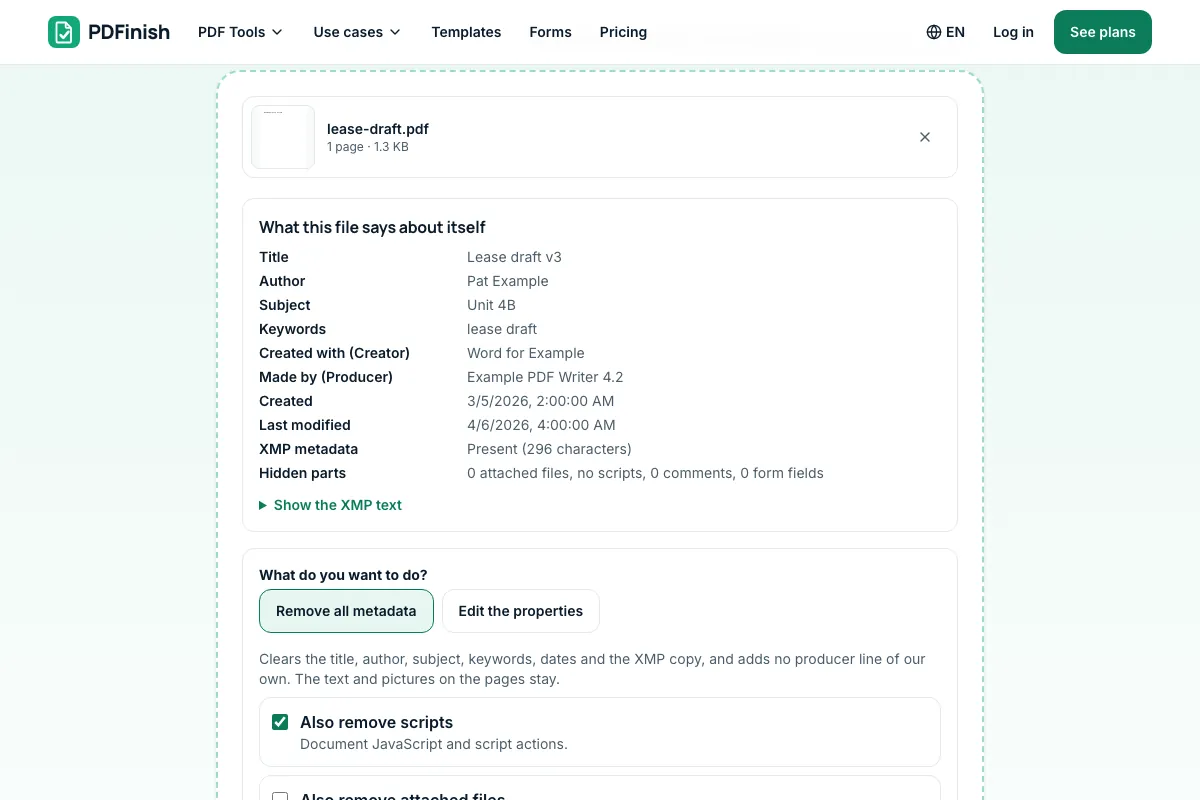
The tool lists the title, author, dates, any XMP text and counts of attached files, scripts and comments.
Clears the properties and XMP
Removing clears the properties and the XMP stream, and we add no producer line.
Checked after saving
The saved file is read back and the page tells you what is left.
Stays on your device
Your PDF is cleaned in your browser.
Good to know
- The text and pictures on the pages stay as they are. Scripts, attached files and the names on comments can go too, if you tick them.
Common questions
How do I remove metadata from a PDF?
Add the PDF to Remove Metadata from PDF, check the list of what is stored inside it, press Remove metadata and download the clean copy. The title, author, subject, keywords, dates and XMP are cleared in your browser, and no producer line of ours is added.
What metadata does a PDF hold?
A PDF stores a title, author, subject, keywords, the program that made it (creator and producer) and two dates. It can also carry an XMP packet with the same facts and more, attached files, scripts, and a name on each comment. The tool lists all of it for your file.
Is the metadata really gone?
After saving, the tool reads the new file back and reports what is left. The properties and the XMP stream are removed from the file itself, not just hidden, and older saved versions inside the file are not carried over. The result page says what it found.
Does this change the text and pictures on the pages?
No. The pages, text, pictures, links and form fields stay as they are. Only the information about the file is cleared. If the words on a page name someone, they stay; use Redact PDF to black them out. The file name is not changed either.
Can I edit the metadata instead of removing it?
Yes. Switch to Edit the properties, change the title, author, subject, keywords, creator or producer, and save. An empty box removes that one property. The older XMP copy is dropped so it cannot disagree with your new values. PDF Metadata Editor opens in this mode.
Is my file uploaded when I use Remove Metadata from PDF?
No. Your PDF is cleaned in your browser. The file is not sent to our servers.
Is Remove Metadata from PDF free, and are there limits?
You can use it free. You get 2 free uses in total, no account needed. Free files can be up to 50 MB. Pro has no limit on uses and allows files up to 500 MB. We check the limits before a use starts, so a finished file is never held back.
Can I use Remove Metadata from PDF on a Windows PC?
Yes. Open this page in Chrome or Edge on your PC, add your file and download the result. Nothing to install, and your file stays on your device.
More about this tool
How to remove metadata from a PDF in 3 steps
To remove metadata from a PDF, add the file, check the list of what it says about itself, press Remove metadata and download the clean copy. The title, author, subject, keywords, dates and XMP are cleared in your browser, and we read the saved file back to check.
- 1
Add your PDF
Drop the PDF onto the tool, or choose it from your device. The properties stored inside it are listed straight away, before you change anything.
- 2
Choose what goes
Keep Remove all metadata selected. Tick Also remove scripts, attached files or the author names on comments if the file has them. Switch to Edit the properties if you would rather change a value than clear it.
- 3
Download the clean copy
Press Remove metadata and save the file. The result page reports what we found when we read the saved copy back, so you know the title, author, dates and XMP are gone.
How do I remove metadata from a PDF for free?
Use Remove Metadata from PDF. You get 2 free uses in total with no account, and one finished clean copy counts as one use. Free files can be up to 50 MB. Pro has no limit on uses and allows files up to 500 MB.
What is PDF metadata?
PDF metadata is the information stored inside the file about the file: title, author, subject, keywords, the program that made it, and the dates it was created and last changed. A newer copy, called XMP, can hold the same facts and more. Readers show it under Document Properties.
Why remove metadata from a PDF?
The properties often show a real name, the name of a company, the software used or a draft title you never meant to share. Wiping them before you send a contract, a resume or a scan keeps those details private. The pages themselves look exactly the same afterwards.
How do I see a PDF's metadata?
Add the file to Remove Metadata from PDF and the page lists the title, author, subject, keywords, creator, producer and both dates, shows any XMP text, and counts attached files, scripts, comments and form fields. Nothing changes until you press the button.
What is XMP metadata in a PDF?
XMP is a block of XML inside the PDF that repeats the document properties and can add more, such as the editing tool and its history. Some viewers read it instead of the plain properties, so a clean file needs both gone. This tool removes the XMP stream along with the properties.
Can I remove the author name from a PDF?
Yes. The author is part of the properties and goes with the rest when you remove the metadata. Names on comments are separate, so the tool offers a tick box to remove those too. Text typed on the pages is content and stays unless you redact it.
Does removing metadata remove attached files and scripts?
Only if you tick them. Scripts are small programs inside the PDF, and the box to remove them is on by default. Attached files are content, so that box starts off. The tool shows how many of each the file has, and the saved copy is read back to confirm.
Is it safe to remove metadata from a confidential PDF online?
With Remove Metadata from PDF your file is cleaned inside your browser and is not sent to our servers. You can check this in your browser's network tab while you work: no request carries your file. Still follow your own organization's rules for confidential documents.
Will removing metadata break a digital signature?
Yes. A signature covers the whole file, so any change, including clearing the properties, makes it invalid. The tool warns you when a file is signed. Clean a copy before it is signed, and sign afterwards, rather than the other way round.
How do I change PDF metadata instead?
Open PDF Metadata Editor, add the file and change the title, author, subject or keywords in the boxes. To clear a property, empty its box. For the pages themselves, use Edit PDF. To hide text on the pages, use Redact PDF.
Key facts
- Privacy: We don't sell your data. This tool runs in your browser, so your files stay on your device and are never uploaded.
- Ads: none. No third-party ads and no ad cookies.
- Limits: 2 free uses in total, no account needed, and no limit on uses with Pro. Files up to 50 MB free, 500 MB with Pro. Limits are checked before a use starts, never after.
- Price: free to start. Pro is $2.99 a month or $24 a year. Lifetime is $50 for the first 500 founders. Pro cancels in one click.
- Works on: Windows, Mac, iPhone, Android. Nothing to install.
- Your PDF is cleaned in your browser. It is never uploaded.
- Before you change anything, the tool lists the title, author, subject, keywords, creator, producer and dates, any XMP text, and counts of attached files, scripts, comments and form fields.
- Removing clears the properties and the XMP stream, and we add no producer line of our own. Scripts, attached files and the names on comments can go too, if you tick them.
- The saved file is read back and the page tells you what is left. The text and pictures on the pages stay as they are.
Last updated:
By the PDFinish editorial team · Reviewed
Related toolsSecurity
PDF Metadata Editor
Change the title, author and keywords inside a PDF.
Redact PDF
Black out words or areas and remove them for good.
Password Protect PDF
Add a password so only people you trust can open the file.
Flatten PDF
Lock form fields and comments into the page.
Compress PDF
Shrink a PDF so it is easier to email and upload.
PDF Editor
Change a line of text, or add text, shapes and images.