Convert Markdown to PDF
Add a Markdown file or paste your text and get a PDF.
or drop them here. .md or .txt files, or a .zip with pictures. Markdown files up to 50 MB
Your file stays on your device. Nothing is uploaded unless you choose Email it to me.
- 2 free uses in total, no account needed
- No ads
- Nothing to install
How it works
1. Add your Markdown
Choose a .md file from your device, or paste your Markdown.
2. Check the preview and choose how it looks
Check the preview and pick the font, text size and page size.
3. Download your PDF
Save the PDF. Each heading becomes a bookmark.
What you can do in this tool
Markdown carries over
Headings, bold and italic, lists, task lists, tables, quotes, code blocks and links carry over.
Links and bookmarks
Links stay clickable. Headings become bookmarks. Code is set in a monospaced font.
Pictures with your file
Pictures work when you drop them with the file or put everything in a .zip.
Stays on your device
Your Markdown is read and drawn in your browser. Raw HTML in it is never run, and no web address is visited.
Works on any device
Runs in your browser on Windows, Mac, iPhone, Android or a Chromebook. Nothing to install.
Good to know
- Your Markdown is read and drawn in your browser. Headings, paragraphs, bold and italic, lists, task lists, tables, quotes, code blocks and links carry over, and the words stay selectable and searchable.
- Links stay clickable. Headings become bookmarks. Code is set in a monospaced font. Pictures work when you drop them with the file or put everything in a .zip.
- Raw HTML inside the Markdown is never run or drawn, and no web address is visited. Pictures at web addresses are not loaded.
Common questions
How do I convert a Markdown file to PDF?
Add the .md file, or paste your Markdown. Check the preview, choose the font, text size and page size, then press Convert to PDF. The file downloads from the result screen. If your file shows pictures, drop them with it or zip everything together.
Which Markdown features are supported?
Headings, paragraphs, bold, italic and strikethrough, bullet, numbered and task lists, tables with aligned columns, block quotes, code blocks, inline code, links, horizontal rules and JPG or PNG pictures. This is standard GitHub-style Markdown. Footnotes, math and diagrams are not drawn.
Is the text in the PDF selectable?
Yes. The words are drawn as real text, not as a picture of text, so you can select, copy and search them. Links stay clickable, and each heading becomes a bookmark you can jump to from the bookmarks panel of any PDF reader.
Why are my pictures missing?
Pictures at web addresses (http or https) are not loaded, on purpose. Pictures you drop with the file, or put in a .zip beside it, work when the path in the Markdown matches the file name. JPG and PNG are read. GIF, WebP and SVG pictures are skipped, and a note counts what was missed.
What happens to raw HTML in my Markdown?
It is skipped, never run and never drawn, and the note under the preview counts how many pieces were left out. Your Markdown is read as text and laid out by our own code, so a script or an embedded frame in it cannot do anything. Write the content in Markdown instead.
Is my file uploaded when I use Markdown to PDF?
No. Your Markdown is laid out and saved as a PDF in your browser. The file is not sent to our servers.
Is Markdown to PDF free, and are there limits?
You can use it free. You get 2 free uses in total, no account needed. Free files can be up to 50 MB. Pro has no limit on uses and allows files up to 500 MB. We check the limits before a use starts, so a finished file is never held back.
Can I use Markdown to PDF on a Windows PC?
Yes. Open this page in Chrome or Edge on your PC, add your file and download the result. Nothing to install, and your file stays on your device.
More about this tool
How to convert Markdown to PDF in 3 steps
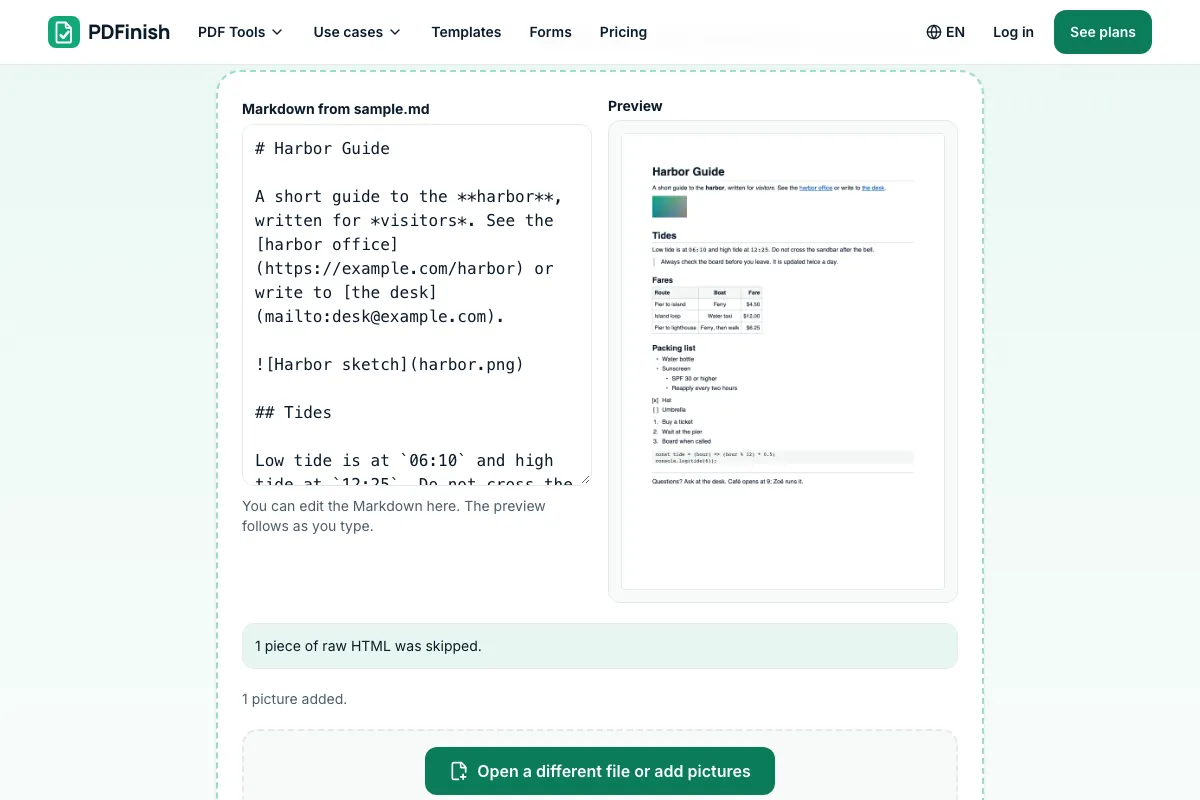
To convert Markdown to PDF, add your .md file (with its pictures if it has any) or paste your Markdown, check the live preview, choose the font, size and page size, and download the PDF. The text stays selectable, and nothing is uploaded.
- 1
Add your Markdown
Drop a .md file onto the tool, or choose one from your device. If it shows pictures, drop them with the file, or put the file and its pictures in a .zip. You can also paste Markdown instead and edit it in the box.
- 2
Check the preview and choose how it looks
The preview redraws as you type or change the font, size or page size. Pick sans-serif or serif, a text size from 9 to 16 points, and A4 or US Letter. A note lists anything that was left out.
- 3
Download your PDF
Save the finished file. The text flows onto as many pages as it needs, and each heading is a bookmark.
How do I convert Markdown to PDF?
Add your .md file to Markdown to PDF, or paste your text, check the preview, choose a font and page size, and download the PDF. Your Markdown is read in your browser. It is not sent to our servers, and the words in the PDF stay selectable.
How do I convert an MD file to PDF?
An .md file is a Markdown file. Drop it on Markdown to PDF and press Convert to PDF. A .txt file with Markdown in it works too. If the file refers to pictures, drop the pictures with it, or put the file and the pictures in one .zip.
Can I paste Markdown instead of uploading a file?
Yes. Choose Or paste your Markdown on the tool, paste your text into the box, and the preview shows the PDF page as you type. You can edit the text there before you convert it. Nothing is sent anywhere, because the box is read by your own browser.
Can I convert Markdown with images to PDF?
Yes. Put the .md file and its pictures in one folder, then drop them together or zip them. A picture written as  is placed in the PDF when a file with that name is found. JPG and PNG work. Pictures at web addresses are not loaded.
Does Markdown to PDF keep tables and code blocks?
Yes. Tables become ruled grids with a shaded header row and the column alignment you wrote, and a long table repeats its header on the next page. Code blocks are set in a monospaced font on a light background, with long lines wrapped. Syntax colours are not applied.
Does Markdown to PDF keep my links?
Yes. Web and email links stay clickable in the PDF and are underlined so they read as links on paper too. Links that point to another part of the same document are drawn as plain text. Links that start with javascript: are never made clickable.
Is it safe to convert Markdown to PDF online?
With Markdown to PDF, your file is read and drawn inside your browser and is not sent to our servers. Raw HTML in it is never run, and we never visit a web address from it. You can check this in your browser's network tab while you convert.
Can I convert Markdown to PDF for free?
Yes. You get 2 free uses in total with no account, and one conversion counts as one use. Free files can be up to 50 MB each. Pro has no limit on uses and allows files up to 500 MB. The limit is checked before the conversion starts.
Can I turn a PDF back into Markdown or text?
You can pull the words out of a PDF with PDF to Text, which gives you plain text in reading order. We do not make Markdown from a PDF. For plain text going the other way, with a monospace option, use TXT to PDF.
Can I add page numbers to my Markdown PDF?
Yes, as a second step. Convert your Markdown first, then open the PDF in Add Page Numbers, choose where the numbers go, and download the result. If the Markdown came from a web page you saved as HTML, use HTML to PDF for that file instead.
Key facts
- Privacy: We don't sell your data. This tool runs in your browser, so your files stay on your device and are never uploaded.
- Ads: none. No third-party ads and no ad cookies.
- Limits: 2 free uses in total, no account needed, and no limit on uses with Pro. Files up to 50 MB free, 500 MB with Pro. Limits are checked before a use starts, never after.
- Price: free to start. Pro is $2.99 a month or $24 a year. Lifetime is $50 for the first 500 founders. Pro cancels in one click.
- Works on: Windows, Mac, iPhone, Android. Nothing to install.
- Your Markdown is read and drawn in your browser. Headings, paragraphs, bold and italic, lists, task lists, tables, quotes, code blocks and links carry over, and the words stay selectable and searchable.
- Links stay clickable. Headings become bookmarks. Code is set in a monospaced font. Pictures work when you drop them with the file or put everything in a .zip.
- Raw HTML inside the Markdown is never run or drawn, and no web address is visited. Pictures at web addresses are not loaded.
Last updated:
By the PDFinish editorial team · Reviewed
Related toolsConvert
TXT to PDF
Turn a plain text file, or text you paste, into a PDF.
HTML to PDF
Turn an HTML file, a zip, or pasted HTML into a PDF.
Word to PDF
Convert a Word document into a PDF.
EPUB to PDF
Turn an EPUB book into a PDF, with its contents as bookmarks.
Add Page Numbers to PDF
Stamp page numbers onto every page of a PDF.
Add Bookmarks to PDF
Add and reorder bookmarks that jump to pages.
Merge PDF
Combine several PDFs into one file, in the order you choose.
Compress PDF
Shrink a PDF so it is easier to email and upload.
PDF to Markdown
Turn a PDF into Markdown with headings, lists and tables.
JSON to PDF
Turn a JSON file into a readable, indented PDF.