Convert PDF to HTML
Add your PDF and get one clean HTML file.
or drop it here. PDF files up to 50 MB
Your file stays on your device. Nothing is uploaded unless you choose Email it to me.
- 2 free uses in total, no account needed
- No ads
- Nothing to install
How it works
1. Add your PDF
Choose your PDF from your device or drop it on the page.
2. Choose the options
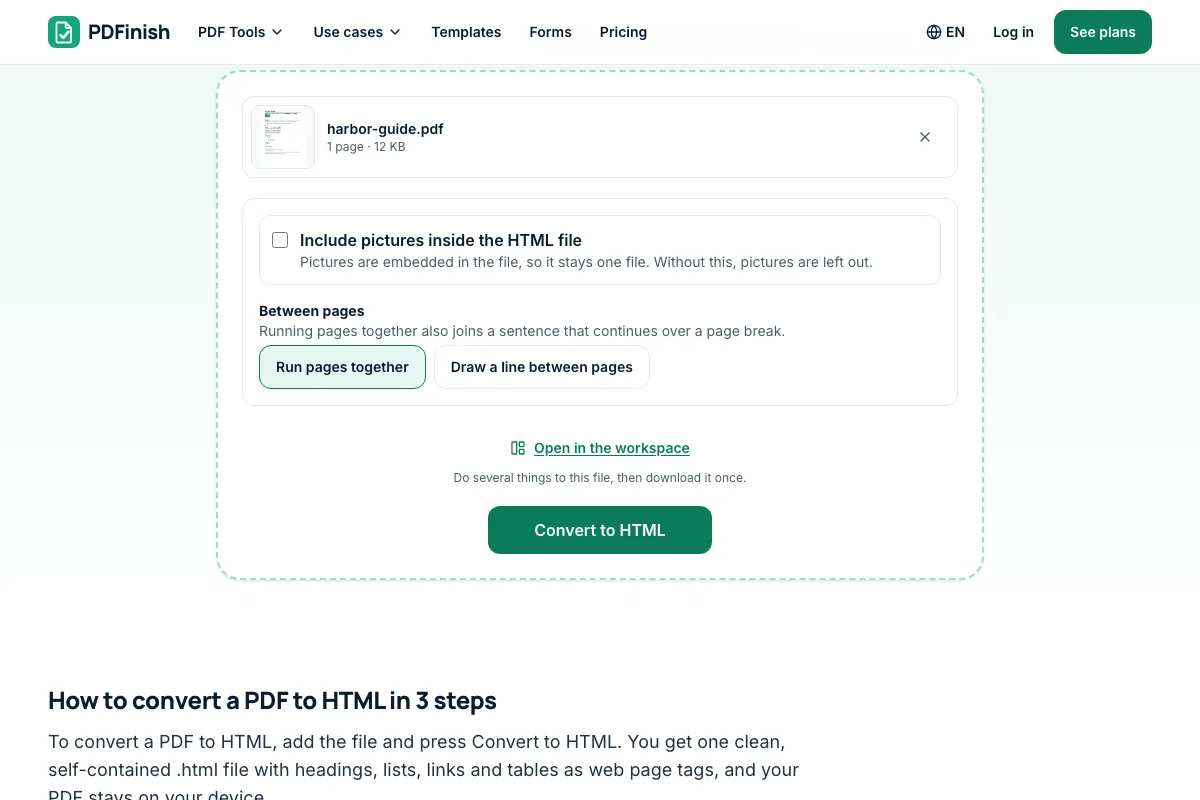
Choose whether to embed the pictures, then press Convert to HTML.
3. Download your HTML
Save the .html file and look it over once.
What you can do in this tool
Real tags
Headings, paragraphs, lists, links and a table with a header row come out as web page tags.
One self-contained file
A little CSS is built in, with no scripts and no outside files.
Pictures if you want them
Pictures are left out unless you tick the box; then they are embedded in the same file.
Stays on your device
Your PDF is read and converted in your browser. The file is not sent to our servers.
Works on any device
Runs in your browser on Windows, Mac, iPhone, Android or a Chromebook. Nothing to install.
Good to know
- Your PDF is read in your browser. Nothing is uploaded, so the text in it stays private.
- The tool rebuilds the structure of the text with real tags: h1 to h3 headings, p paragraphs, ul and ol lists, strong and em, a links, and a table with a header row. A little CSS is built in, with no scripts and no outside files.
- It is not a pixel copy of the layout, so columns, colours and fonts are not kept. Pictures are left out unless you tick the box; then they are embedded in the same file. A scanned page has no text to read and points you to OCR PDF.
Common questions
How do I convert a PDF to HTML?
Add the PDF to PDF to HTML and press Convert to HTML. The tool reads the text, works out headings, paragraphs, lists, links and tables, and writes one .html file. Open it in any browser. The conversion happens in your browser, so the PDF is not uploaded.
Is the HTML a copy of my PDF's layout?
No. It rebuilds the structure of the text as clean, readable HTML that reflows on any screen. Page size, columns, colours, fonts and exact spacing are not kept. If you need the page to look the same, share the PDF itself or save its pages as pictures.
What does the HTML file contain?
One file with a doctype, a title, a small style block, and the content as h1 to h3, p, ul, ol, strong, em, a and table tags. There are no scripts, no tracking and no links to outside files. If you tick the box, pictures are embedded as data URIs in the same file.
Why are some headings wrong?
A PDF does not store headings. The tool guesses them from type that is larger than the body text, and from bold lines. A bold label in body size can come out as a paragraph, and a large pull quote can come out as a heading. Edit those tags in the file.
Why is my converted file empty?
A scanned page or a photo of a page holds a picture of words, not the words themselves, so there is nothing to read. Run the file through OCR PDF first, which reads English, then convert the result. Text turned sideways on the page is also left out.
Is my file uploaded when I use PDF to HTML?
No. The pages are read and the HTML is written in your browser. The file is not sent to our servers.
Is PDF to HTML free, and are there limits?
You can use it free. You get 2 free uses in total, no account needed. Free files can be up to 50 MB. Pro has no limit on uses and allows files up to 500 MB. We check the limits before a use starts, so a finished file is never held back.
Can I use PDF to HTML on a Windows PC?
Yes. Open this page in Chrome or Edge on your PC, add your file and download the result. Nothing to install, and your file stays on your device.
More about this tool
How to convert a PDF to HTML in 3 steps
To convert a PDF to HTML, add the file and press Convert to HTML. You get one clean, self-contained .html file with headings, lists, links and tables as web page tags, and your PDF stays on your device.
- 1
Add your PDF
Drop the file onto the tool, or choose it from your device. A PDF with a password needs to be unlocked first.
- 2
Choose the options
Tick the box to embed the pictures in the file, and choose whether pages run together or a line is drawn between them. Then press Convert to HTML.
- 3
Download your HTML
Save the .html file and open it in any browser, or paste its body into your site. Look it over once, since headings and lists are worked out from the type and spacing.
How do I convert PDF to HTML for free?
Add your file to PDF to HTML and press Convert to HTML. You get 2 free uses in total with no account, and one finished conversion counts as one use. Free files can be up to 50 MB. Your PDF is read in your browser and is not uploaded.
How do I turn a PDF into a web page?
Convert it with PDF to HTML and upload the .html file to your site, or open it from your device in any browser. The text reflows to fit the screen, links work, and tables stay tables. Read it over first, since headings are worked out from type size.
Can I keep the images when converting PDF to HTML?
Yes. Tick the box to embed the pictures before you convert. They are written into the same .html file as data URIs, so you still have one file and nothing to unpack or host separately. Without the box, pictures are left out and the tool says so.
Does PDF to HTML keep tables and links?
Yes, simple ones. A table found from drawn lines or from rows that line up in columns becomes a real table with a header row. Web and email links in the PDF become working links. Merged cells and cells that wrap onto a second line may need tidying.
Can I convert a scanned PDF to HTML?
Not directly. A scan is a picture of a page, so it has no text for the tool to read. Run it through OCR PDF first to make the text selectable, then convert the result. Check the text afterwards, since reading a scan can misread letters and numbers.
Is it safe to convert PDF to HTML online?
With PDF to HTML your file never leaves your device. The pages are read and the HTML is written inside your browser tab, so nothing is sent to our servers and there is nothing for us to delete. You can check the browser's network tab, which shows no upload.
What is the difference between PDF to HTML and PDF to Markdown?
Both rebuild headings, lists, links and tables. PDF to Markdown writes plain text with simple marks for notes apps and repositories. PDF to HTML writes web page tags with a little built-in style, ready to open in a browser. Pick the one your next step reads.
How do I turn an HTML file back into a PDF?
Use HTML to PDF. Add the .html file, a zip with its pictures, or pasted code, and download the PDF. It also runs in your browser and never fetches web addresses or runs scripts. It suits a page you saved or one you just made here.
Does PDF to HTML work on my phone?
Yes. It runs in the browser on a phone or tablet, with no app to install. Add the PDF from your files, press Convert to HTML, then save the .html file. Very long documents take longer on a phone, since the pages are read on the device itself.
Can I edit the HTML file afterwards?
Yes. It is plain HTML with a short style block, so any text or code editor can open it. Change the words, fix a heading tag, or move the style into your own stylesheet. Because the tags are real headings, lists and tables, the page also reads well for screen readers.
Key facts
- Privacy: We don't sell your data. This tool runs in your browser, so your files stay on your device and are never uploaded.
- Ads: none. No third-party ads and no ad cookies.
- Limits: 2 free uses in total, no account needed, and no limit on uses with Pro. Files up to 50 MB free, 500 MB with Pro. Limits are checked before a use starts, never after.
- Price: free to start. Pro is $2.99 a month or $24 a year. Lifetime is $50 for the first 500 founders. Pro cancels in one click.
- Works on: Windows, Mac, iPhone, Android. Nothing to install.
- Your PDF is read in your browser. Nothing is uploaded, so the text in it stays private.
- The tool rebuilds the structure of the text with real tags: h1 to h3 headings, p paragraphs, ul and ol lists, strong and em, a links, and a table with a header row. A little CSS is built in, with no scripts and no outside files.
- It is not a pixel copy of the layout, so columns, colours and fonts are not kept. Pictures are left out unless you tick the box; then they are embedded in the same file. A scanned page has no text to read and points you to OCR PDF.
Last updated:
By the PDFinish editorial team · Reviewed
Related toolsConvert
PDF to Markdown
Turn a PDF into Markdown with headings, lists and tables.
HTML to PDF
Turn an HTML file, a zip, or pasted HTML into a PDF.
PDF to Text
Pull the text out of a PDF to copy or save as .txt.
PDF to Word
Convert a PDF into an editable Word document.
OCR PDF
Make scanned pages searchable and selectable.
Extract Images
Save every picture inside a PDF at full quality.
TXT to PDF
Turn a plain text file, or text you paste, into a PDF.
PDF to EPUB
Turn a PDF into an EPUB e-book.