Convert JSON to PDF
Add a JSON file or paste your JSON and get a PDF.
or drop it here. .json files. JSON files up to 50 MB
Your file stays on your device. Nothing is uploaded unless you choose Email it to me.
- 2 free uses in total, no account needed
- No ads
- Nothing to install
How it works
1. Add your JSON
Choose a .json file from your device, or paste your JSON.
2. Choose how it looks
Pick the indent, colors, font size, page size and direction.
3. Download your PDF
Save the PDF. Long lines wrap onto as many pages as it needs.
What you can do in this tool
Printed exactly as written
Numbers, key order and escapes are printed exactly as written, so a long ID is never rounded.
Colors that print in black and white
Keys, text, numbers and true, false or null are shown in colors that still read on a black and white printer.
Readable layout
Each level is indented, long lines wrap, and line numbers are optional.
Stays on your device
Your JSON is read and drawn in your browser. Nothing is uploaded, so records, keys and responses stay private.
Works on any device
Runs in your browser on Windows, Mac, iPhone, Android or a Chromebook. Nothing to install.
Good to know
- Your JSON is read and drawn in your browser. Nothing is uploaded, so records, keys and responses stay private.
- Keys, text, numbers and true, false or null are shown in colors that still read on a black and white printer. Numbers, key order and escapes are printed exactly as written, so a long ID is never rounded.
- Each level is indented, long lines wrap, and line numbers are optional. A file with a mistake shows the line and can still be printed as plain text.
Common questions
How do I convert a JSON file to PDF?
Add the .json file, or paste your JSON. Choose the layout, font size and page size, then press Convert to PDF. The tool checks the JSON first and shows any error with its line. The PDF downloads from the result screen, and the work happens in your browser.
What happens if my JSON is not valid?
The tool shows the line and column of the first problem and says what it found, such as a trailing comma, single quotes, a missing comma or a comment. Fix it in the box and the check runs again. Or press Convert as plain text: the PDF prints your text as it is and shades the line with the problem.
Will big numbers or key order change?
No. The tool does not turn your JSON into objects and back, so a number such as 12345678901234567890 is printed with every digit, and keys stay in the order of the file. Text is printed as written, including escapes such as \u00e9 and \n.
Does it work with JSON Lines or files with comments?
Not yet. A file holds one JSON value, and comments and trailing commas are not part of JSON, so the tool points at the first one it meets. For JSON Lines, wrap the lines in an array with commas between them, or print the file with TXT to PDF.
Which characters and encodings work?
UTF-8, UTF-16 and older Windows text files are read. Latin, Greek and Cyrillic letters can be drawn. Chinese, Japanese, Korean, Arabic, Hebrew and emoji cannot yet, and we name the characters that are the problem instead of drawing empty boxes.
Is my file uploaded when I use JSON to PDF?
No. Your JSON is checked and saved as a PDF in your browser. The file is not sent to our servers.
Is JSON to PDF free, and are there limits?
You can use it free. You get 2 free uses in total, no account needed. Free files can be up to 50 MB. Pro has no limit on uses and allows files up to 500 MB. We check the limits before a use starts, so a finished file is never held back.
Can I use JSON to PDF on a Windows PC?
Yes. Open this page in Chrome or Edge on your PC, add your file and download the result. Nothing to install, and your file stays on your device.
More about this tool
How to convert JSON to PDF in 3 steps
To convert JSON to PDF, add your .json file or paste the JSON, choose the layout, font size and page size, and download the PDF. The JSON is checked in your browser, so it is not uploaded, and a mistake such as a missing comma is shown with its line number.
- 1
Add your JSON
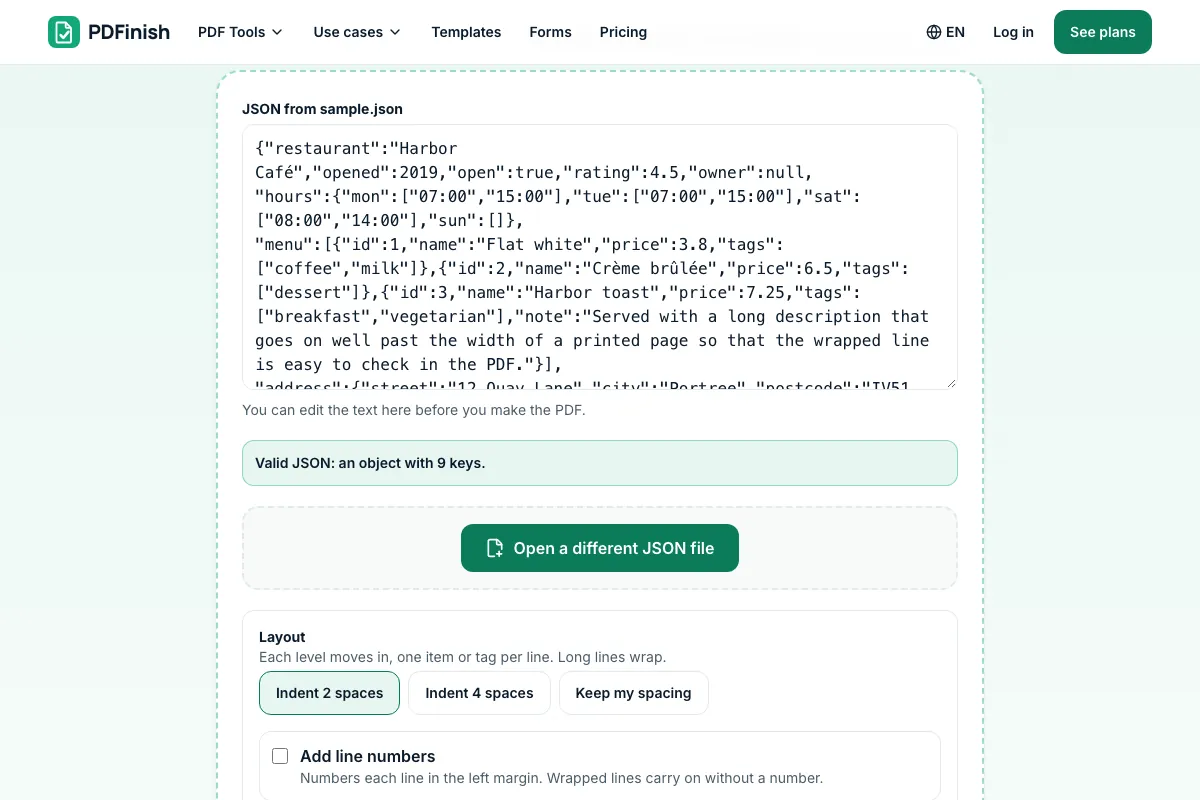
Drop a .json file onto the tool, or choose one from your device. You can also paste JSON instead, and fix it in the box before you make the PDF.
- 2
Choose how it looks
Indent by 2 or 4 spaces, or keep your own spacing. Turn line numbers and colors on or off, pick a font size from 6 to 14 points, A4 or US Letter, and portrait or landscape.
- 3
Download your PDF
Save the finished file. Long lines wrap, and the text flows onto as many pages as it needs. If the JSON has an error, you see the line first and can still print it as plain text.
How do I save a JSON file as a PDF?
Add the file to JSON to PDF, or paste the JSON, then press Convert to PDF. You get an indented PDF with keys, text, numbers and values in different colors, and wide lines wrap to fit the page. The file is checked and drawn in your browser and is not sent to our servers.
How do I convert JSON to PDF?
Open JSON to PDF, add your .json file or paste your JSON, choose the indent, text size and page size, and press Convert to PDF. The PDF downloads straight away. Each finished conversion counts as one of your free uses, and the limit is checked before you start.
How do I pretty-print JSON so it is easy to read?
Add the JSON to JSON to PDF and keep the indent at 2 spaces. Every key and array item goes on its own line, moved in one level for each level of nesting. An empty object or list stays on one line as {} or [], so the structure is easy to follow.
Can I add line numbers to a JSON PDF?
Yes. Tick Add line numbers and each line is numbered in the left margin of the PDF. A long line that wraps carries on below with no new number, so the numbers match the lines of the formatted JSON. This helps when you discuss a file with someone and need to point to a spot.
Is it safe to convert JSON to PDF online?
With JSON to PDF, your file is checked and drawn inside your browser and is not sent to our servers. JSON often holds tokens, customer records or settings, so this matters. You can confirm it in your browser's network tab, which shows no upload while you convert.
Can I convert JSON to PDF for free?
Yes. You get 2 free uses in total with no account, and one finished conversion counts as one use. Free files can be up to 50 MB each. Pro has no limit on uses and allows files up to 500 MB. The limit is checked before you start.
How do I find the mistake in my JSON?
Paste or add the file to JSON to PDF. If it is not valid, the tool shows the line and column and shows that line's text, with a message such as a trailing comma or single quotes. Fix it in the box and the check runs again straight away.
Can I convert JSON to PDF on a Mac or a phone?
Yes. JSON to PDF runs in the browser on a Mac, Windows, Linux, iPhone, iPad or Android device, so you need no extra software. On a phone, choose the file from your Files app or downloads folder, or paste the JSON. Then download the PDF.
Can I keep several JSON files in one PDF?
Convert each file on its own, then join the PDFs with Merge PDF, which also runs in your browser. Put them in the order you want first. You can then add page numbers with Add Page Numbers, which helps when you hand the file to someone.
What if my file is XML, CSV or plain text instead?
Use the tool for that format: XML to PDF for XML, CSV to PDF for a table, HTML to PDF for a web page and TXT to PDF for plain text. JSON to PDF is for JSON, including API responses and settings files.
Key facts
- Privacy: We don't sell your data. This tool runs in your browser, so your files stay on your device and are never uploaded.
- Ads: none. No third-party ads and no ad cookies.
- Limits: 2 free uses in total, no account needed, and no limit on uses with Pro. Files up to 50 MB free, 500 MB with Pro. Limits are checked before a use starts, never after.
- Price: free to start. Pro is $2.99 a month or $24 a year. Lifetime is $50 for the first 500 founders. Pro cancels in one click.
- Works on: Windows, Mac, iPhone, Android. Nothing to install.
- Your JSON is read and drawn in your browser. Nothing is uploaded, so records, keys and responses stay private.
- Keys, text, numbers and true, false or null are shown in colors that still read on a black and white printer. Numbers, key order and escapes are printed exactly as written, so a long ID is never rounded.
- Each level is indented, long lines wrap, and line numbers are optional. A file with a mistake shows the line and can still be printed as plain text.
Last updated:
By the PDFinish editorial team · Reviewed
Related toolsConvert
XML to PDF
Turn an XML file into a readable, indented PDF.
TXT to PDF
Turn a plain text file, or text you paste, into a PDF.
CSV to PDF
Turn a CSV file into a tidy PDF table.
HTML to PDF
Turn an HTML file, a zip, or pasted HTML into a PDF.
Markdown to PDF
Turn a Markdown file or pasted Markdown into a clean PDF.
Add Page Numbers to PDF
Stamp page numbers onto every page of a PDF.
Merge PDF
Combine several PDFs into one file, in the order you choose.
Compress PDF
Shrink a PDF so it is easier to email and upload.