Convert a PDF to black and white
Turn every page grey for printing, then download the copy.
or drop it here. PDF files up to 50 MB
Your file stays on your device. Nothing is uploaded unless you choose Email it to me.
- 2 free uses in total, no account needed
- No ads
- Nothing to install
How it works
1. Add your PDF
Choose it from your device or drop it on the page.
2. Pick the picture quality
Pick a picture quality of 150, 200 or 300 DPI.
3. Save the grey copy
Save the grey copy. Your original is not changed.
What you can do in this tool
Every page in grey
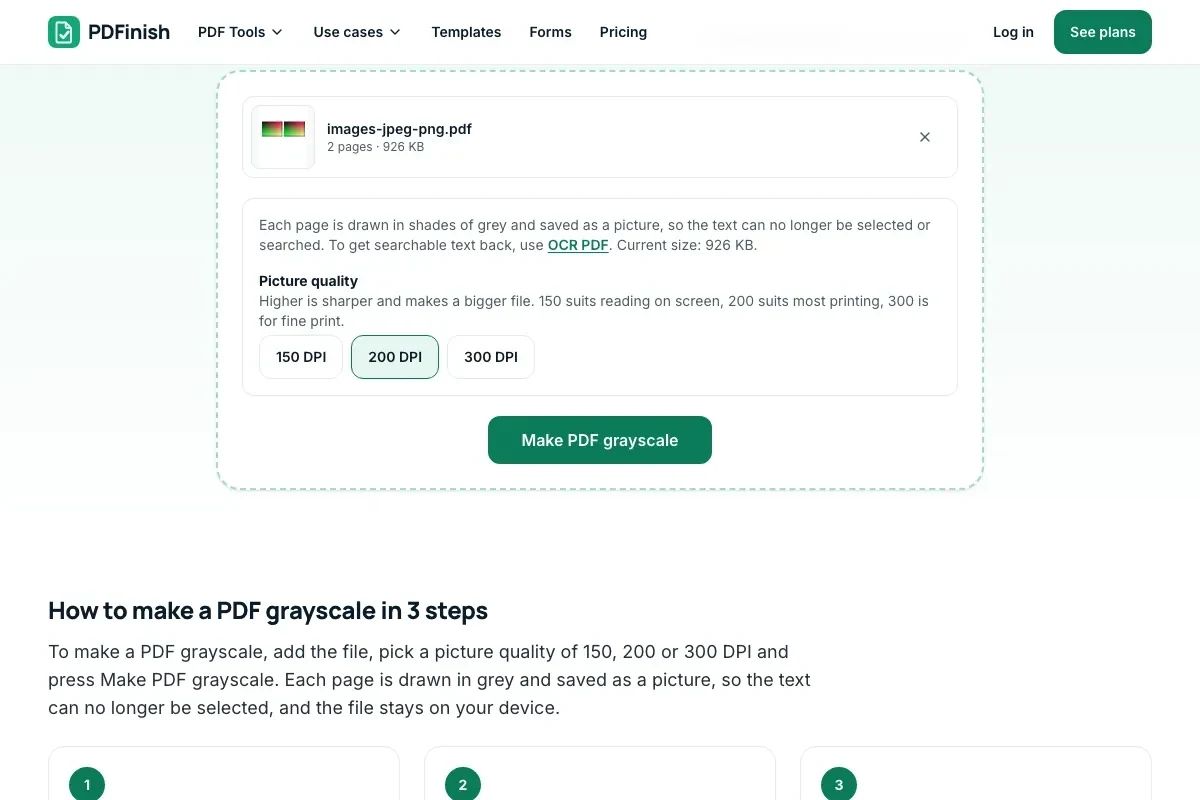
Each page is drawn in shades of grey and saved in a new PDF.
Three qualities
150 DPI suits reading on screen, 200 most printing and 300 fine print.
Sizes side by side
The result shows the size before and after.
Stays on your device
Your pages are drawn in your browser.
Works on any device
Runs in your browser with nothing to install.
Good to know
- Each page is saved as a picture, so the text can no longer be selected or searched. To get searchable text back, use OCR PDF.
Common questions
How do I make a PDF grayscale?
Add the PDF, choose 150, 200 or 300 DPI, and press Make PDF grayscale. Each page is drawn in grey and saved into a new PDF. Download it from the result screen.
Is a grayscale PDF the same as black and white?
Almost. Grayscale keeps shades of grey, so photos and shading still look right, while true black and white has only black and white dots. This tool makes grayscale. Printers show it in black ink only, which is what most people want.
Can I still select or search the text?
No. To turn colours to grey we draw each page and save it as a picture, so the text becomes part of the picture. Run OCR PDF on the result to get searchable text back. Keep the original if you need the real text.
Will the file get smaller?
It depends. The result screen shows the size before and after. A text page can get larger, because a picture holds more than the words, while a page full of colour photos often gets smaller. Pick 150 DPI for a smaller file.
Does it work on scanned PDFs?
Yes. A scan is already a picture, so it is drawn in grey and the words stay as they were. If the scan had searchable text from OCR, that hidden text is lost, so run OCR PDF again.
Is my file uploaded when I use Grayscale PDF?
No. Your pages are drawn in grey in your browser. The file is not sent to our servers.
Is Grayscale PDF free, and are there limits?
You can use it free. You get 2 free uses in total, no account needed. Free files can be up to 50 MB. Pro has no limit on uses and allows files up to 500 MB. We check the limits before a use starts, so a finished file is never held back.
Can I use Grayscale PDF on a Windows PC?
Yes. Open this page in Chrome or Edge on your PC, add your file and download the result. Nothing to install, and your file stays on your device.
More about this tool
How to make a PDF grayscale in 3 steps
To make a PDF grayscale, add the file, pick a picture quality of 150, 200 or 300 DPI and press Make PDF grayscale. Each page is drawn in grey and saved as a picture, so the text can no longer be selected, and the file stays on your device.
- 1
Add your PDF
Drop the document onto the tool, or choose it from your device. Colour pages, scans and photos all work.
- 2
Pick the picture quality
150 DPI suits reading on screen, 200 suits most printing and 300 is for fine print. The note says plainly that the text becomes part of the picture.
- 3
Save the grey copy
Press Make PDF grayscale and download the new file. The result shows its size next to the size of the file you added.
Key facts
- Privacy: We don't sell your data. This tool runs in your browser, so your files stay on your device and are never uploaded.
- Ads: none. No third-party ads and no ad cookies.
- Limits: 2 free uses in total, no account needed, and no limit on uses with Pro. Files up to 50 MB free, 500 MB with Pro. Limits are checked before a use starts, never after.
- Price: free to start. Pro is $2.99 a month or $24 a year. Lifetime is $50 for the first 500 founders. Pro cancels in one click.
- Works on: Windows, Mac, iPhone, Android. Nothing to install.
- Every page is drawn in shades of grey and saved as a picture in a new PDF, at 150, 200 or 300 DPI. Higher is sharper and a bigger file.
- Because the pages become pictures, the text can no longer be selected, copied or searched, and links and form fields are gone. OCR PDF can read the words back in.
- The result shows the size before and after. A page with photos can get smaller or larger, depending on the quality you pick.
- Your original file is never changed. A digital signature does not survive.
Last updated:
By the PDFinish editorial team · Reviewed