PDF annotator: annotate a PDF
Highlight, comment and draw on your PDF, then save a copy.
or drop it here. PDF files up to 50 MB
Your file stays on your device. Nothing is uploaded unless you choose Email it to me.
- 2 free uses in total, no account needed
- No ads
- Nothing to install
How it works
1. Add your PDF
Choose it from your device or drop it on the page.
2. Highlight, comment and draw
Select words to highlight, or add a note, text box or drawing.
3. Save your annotated PDF
Save the annotated PDF and send it on.
What you can do in this tool
Highlight, underline, strike out
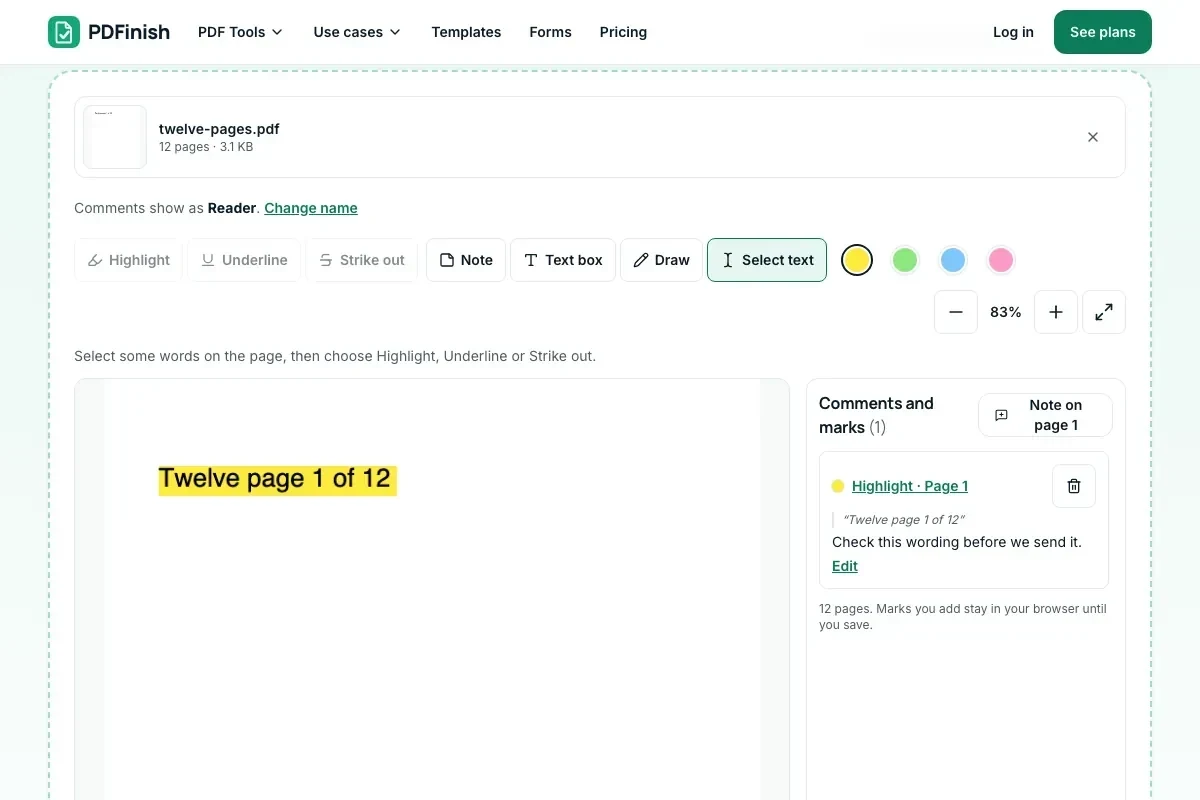
Select words and choose how to mark them. Pick a colour and type a comment on any mark.
Notes, text boxes, drawings
Click the page to add a note or a text box, or draw on it with a finger or pen.
Comments in a list
Every comment shows with its page number. Click one to jump to it, then edit or delete it.
Real PDF annotations
Acrobat, Preview and Chrome show your marks. The copy is saved on your device.
Clean up any time
Marks already in the file show in the list too, and you can delete them.
Good to know
- The marks are saved as standard PDF annotations, so other PDF apps can show them.
- A flattened copy is optional. Keep the editable copy if you want others to reply.
Common questions
How do I annotate a PDF online for free?
Add the file, select some words and press Highlight, or press Note, Text box or Draw and click the page. Type a comment on any mark in the list, then press Save annotated PDF. The new copy downloads from the result screen.
Can other people see my comments in Adobe Acrobat or Preview?
Yes. Highlights, underlines, strike-outs, notes, text boxes and drawings are saved as standard PDF annotations, the same kind other PDF apps make. Acrobat, Preview and browsers such as Chrome show them. We have tested the file in Chrome's viewer; apps differ a little in how they draw the comment pop-ups.
Can the person I send it to reply to my comments?
Yes, if you save the editable copy and leave the flatten box unticked. They open it in a PDF app that supports comments, such as Acrobat or Preview, and add their own marks or replies. A flattened copy cannot be replied to.
Is my file uploaded when I use PDF Annotator?
No. Your PDF is opened and marked up in your browser, and the copy is saved there too. The file is not sent to our servers.
Can I remove comments later?
Before you save, delete any mark from the list. After you save, open the annotated copy here again: the marks that are already in the file show in the list, and you can delete them and save a clean copy. Marks you flatten cannot be removed, so keep the editable copy too.
Is PDF Annotator free, and are there limits?
You can use it free. You get 2 free uses in total, no account needed. Free files can be up to 50 MB. Pro has no limit on uses and allows files up to 500 MB. We check the limits before a use starts, so a finished file is never held back.
Does PDF Annotator work on my phone?
Yes. It works in the browser on a phone or tablet. You can select text and highlight it with your finger, tap the page to add a note, and draw with a finger or pen.
Can I use PDF Annotator on a Windows PC?
Yes. Open this page in Chrome or Edge on your PC, add your file and download the result. Nothing to install, and your file stays on your device.
More about this tool
How to annotate a PDF in 3 steps
To annotate a PDF, add the file, select words and choose Highlight, Underline or Strike out, add notes, text boxes or drawings, then press Save annotated PDF. The marks are saved as standard PDF annotations, so other people can see them in Adobe Acrobat, Preview and their browser.
- 1
Add your PDF
Drop the file onto the tool, or choose it from your device. It opens in your browser straight away.
- 2
Highlight, comment and draw
Select words and choose Highlight, Underline or Strike out. Add a note, a text box or a drawing. Type a comment on any mark, and pick a colour.
- 3
Save your annotated PDF
Press Save annotated PDF and download the copy. Send it to the next person; they see your marks in any PDF app and can reply there.
Key facts
- Privacy: We don't sell your data. This tool runs in your browser, so your files stay on your device and are never uploaded.
- Ads: none. No third-party ads and no ad cookies.
- Limits: 2 free uses in total, no account needed, and no limit on uses with Pro. Files up to 50 MB free, 500 MB with Pro. Limits are checked before a use starts, never after.
- Price: free to start. Pro is $2.99 a month or $24 a year. Lifetime is $50 for the first 500 founders. Pro cancels in one click.
- Works on: Windows, Mac, iPhone, Android. Nothing to install.
- Use it to comment on a PDF, highlight a PDF or add notes to a PDF, with no app to install and no sign-up.
- Highlights, underlines, strike-outs, notes, text boxes and drawings are saved as real PDF annotations. Acrobat, Preview, Chrome and other PDF apps show them.
- Every comment appears in a list with its page number. Click one to jump to it, and edit or delete it any time before you save.
- A flattened copy is optional: it locks the marks into the page so they can no longer be changed. Keep the editable copy if you want others to reply.
- Marks that were already in the file show in the list too, and you can delete them.
Last updated:
By the PDFinish editorial team · Reviewed
Background
Comments and highlights are annotations. See how they sit on top of the page in what a PDF is.