Convert PDF to TIFF
Add your PDF, pick the quality, and download a TIFF.
or drop it here. PDF files up to 50 MB
Your file stays on your device. Nothing is uploaded unless you choose Email it to me.
- 2 free uses in total, no account needed
- No ads
- Nothing to install
How it works
1. Add your PDF
Choose your PDF from your device or drop it on the page.
2. Choose the quality and the files
Pick 150 or 300 DPI, then one multi-page TIFF or one TIFF per page.
3. Download your TIFF
Save the TIFF, or the zip when you chose one file for each page.
What you can do in this tool
150 or 300 DPI
Choose Normal (150 DPI) for screens and email, or High (300 DPI) for printing and archives.
One file or many
Save all pages in one multi-page TIFF, or one TIFF for each page in a zip file.
No loss of quality
A standard baseline TIFF with PackBits compression, so it opens in Preview, Photos, Photoshop and GIMP.
Stays on your device
The pages are drawn in your browser. The file is not sent to our servers.
Works on any device
Runs in your browser on Windows, Mac, iPhone, Android or a Chromebook. Nothing to install.
Good to know
- Choose Normal (150 DPI) for screens and email, or High (300 DPI) for printing and archives. Every page is drawn on a white background in full colour.
- You can save all pages in one multi-page TIFF (.tiff), or one TIFF for each page in a zip file. A one-page PDF always gives a single TIFF.
- The TIFF is a standard baseline file with PackBits compression and no loss of quality, so it opens in Preview, Photos, Photoshop, GIMP, IrfanView and fax and document systems.
Common questions
How do I convert a PDF to TIFF for free?
Add the PDF to PDF to TIFF, choose 150 or 300 DPI, and press Convert to TIFF. Then download the file. You can use it free with 2 free uses in total and no sign-up, and the PDF is not uploaded. Pro has no limit on uses.
Can I get one TIFF with all the pages?
Yes. Choose One multi-page TIFF, and every page you picked is saved as its own image inside a single .tiff file. Choose One TIFF per page (zip) if your system wants a separate file for each page. A PDF with one page gives one TIFF either way.
Which DPI should I choose?
Use Normal (150 DPI) for viewing and email, where smaller files matter. Use High (300 DPI) for printing, archives and fax or records systems, which often ask for 300. High makes files about four times bigger and takes longer, so it suits short documents best.
Why is my TIFF file so big?
A TIFF holds every pixel of every page, so it is much bigger than the PDF it came from. A letter page at 300 DPI has about 8 million pixels. We use PackBits compression, which shrinks white space without losing quality. Choose 150 DPI to make files about four times smaller.
Does the TIFF keep selectable text?
No. A TIFF is a picture of each page, so the words can no longer be selected or searched. If you need text you can search, keep the PDF, or run OCR PDF on it, or copy the words out with PDF to Text.
Is my file uploaded when I use PDF to TIFF?
No. The pages are drawn and the TIFF is written in your browser. The file is not sent to our servers.
Is PDF to TIFF free, and are there limits?
You can use it free. You get 2 free uses in total, no account needed. Free files can be up to 50 MB. Pro has no limit on uses and allows files up to 500 MB. We check the limits before a use starts, so a finished file is never held back.
Can I use PDF to TIFF on a Windows PC?
Yes. Open this page in Chrome or Edge on your PC, add your file and download the result. Nothing to install, and your file stays on your device.
More about this tool
How to convert a PDF to TIFF in 3 steps
To convert a PDF to TIFF, add the file, pick 150 or 300 DPI, choose one multi-page TIFF or one TIFF for each page, and press Convert to TIFF. The pages are drawn in your browser, so the PDF stays on your device.
- 1
Add your PDF
Drop the file onto the tool, or choose it from your device. A PDF with a password needs to be unlocked first.
- 2
Choose the quality and the files
Pick 150 or 300 DPI, then one multi-page TIFF or one TIFF per page. You can convert every page or only the pages you pick.
- 3
Download your TIFF
Save the TIFF, or the zip when you chose one file for each page. High quality takes longer on long documents, so keep the tab open.
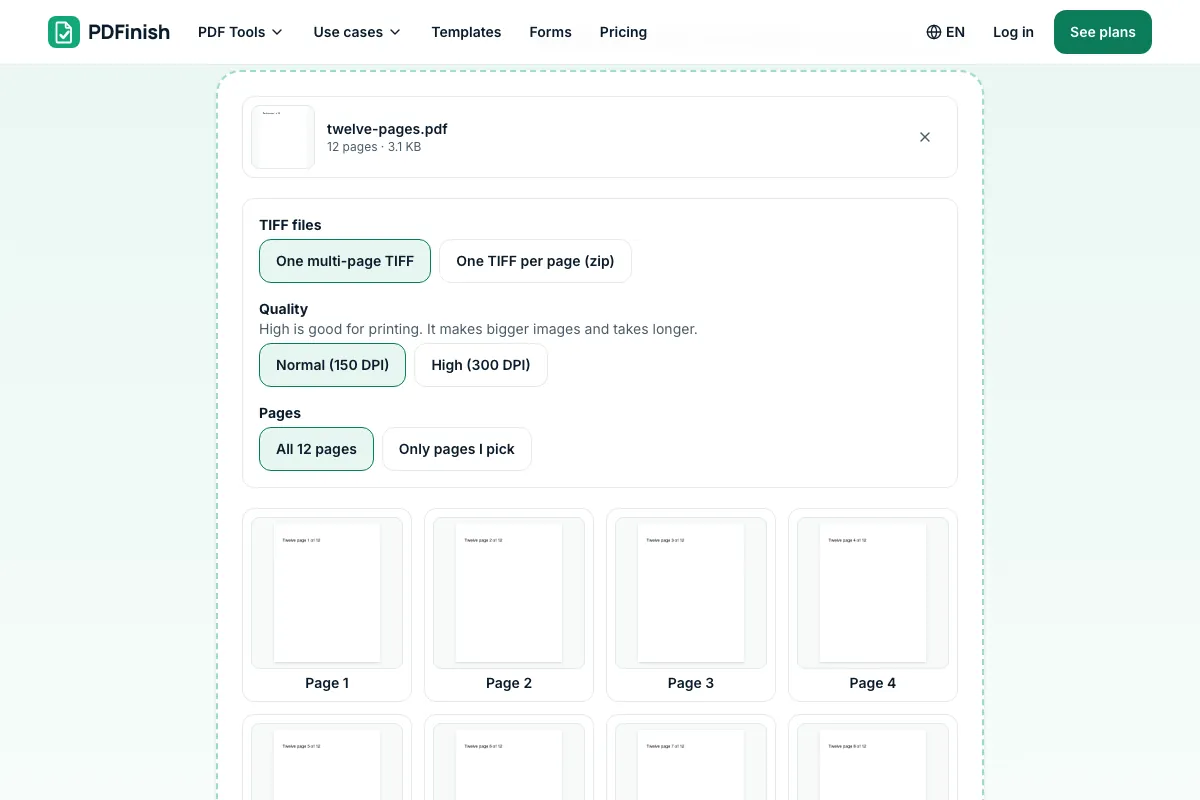
How do I convert a PDF to a TIFF image?
Add your PDF to PDF to TIFF, choose 150 or 300 DPI, and press Convert to TIFF. Each page is drawn in your browser and saved as a TIFF image, in one multi-page file or as a zip of single pages. Your PDF is never uploaded.
What is a TIFF file?
TIFF stands for Tagged Image File Format, an image file used for scans, photos, faxes and archives. It keeps every pixel with no loss of quality and can hold many pages in one file. Print shops, publishers and records systems often ask for it because the format is stable and widely supported.
Can I save a PDF as a multi-page TIFF?
Yes. Pick One multi-page TIFF before you convert, and all the pages you choose are written into a single .tiff file, one image per page, in order. Most viewers show them as pages you can flip through, including Preview on a Mac and Photoshop.
Is it safe to convert PDF to TIFF online?
With PDF to TIFF your file never leaves your device. PDF.js draws each page and the TIFF is written inside your browser tab, so nothing is sent to our servers and there is nothing for us to delete. You can switch off your internet connection after the page loads and it still works.
What DPI is best for a TIFF?
Use 300 DPI for printing, archiving and anything that will be scanned or filed, because it keeps small text sharp. Use 150 DPI when you only need to view the pages or send them by email, because the files come out about four times smaller and finish much faster.
Is a TIFF better than a JPG or PNG?
For archives and print, yes: a TIFF loses no quality and holds many pages. For sharing and the web, a JPG or PNG is better, because the files are far smaller and every browser opens them. Pick TIFF when a system, printer or court asks for it.
Can I convert only some pages of a PDF to TIFF?
Yes. Choose Only pages I pick, then click the page thumbnails you want or type page numbers such as 1-3, 5. Only those pages are drawn and saved. This is quicker than converting a whole file at 300 DPI, and it keeps the TIFF smaller.
Can I convert PDF to TIFF without Photoshop?
Yes. You do not need any image editor or PDF program installed. Add the file to PDF to TIFF in your browser and download the result. It works the same on Windows, Mac, Linux, a phone or a tablet, as long as the browser has enough memory for the pages.
Can I convert PDF to TIFF for free?
Yes. You get 2 free uses in total with no account, and one finished conversion counts as one use, however many pages it holds. Free files can be up to 50 MB. Pro has no limit on uses. The limit is checked before the conversion starts.
Can I turn a TIFF back into a PDF?
Yes. Use TIFF to PDF, which reads every page of a multi-page TIFF and saves them as one PDF, in your browser. The pages come back as pictures, so run OCR PDF afterwards if you want the text to be selectable and searchable again.
Why did my PDF take a long time to convert?
Drawing pages as large pictures takes time, and 300 DPI means about four times more pixels than 150. A long PDF at high quality can take a minute or two. Keep the tab open and wait, or pick fewer pages, or choose Normal quality to finish faster.
Key facts
- Privacy: We don't sell your data. This tool runs in your browser, so your files stay on your device and are never uploaded.
- Ads: none. No third-party ads and no ad cookies.
- Limits: 2 free uses in total, no account needed, and no limit on uses with Pro. Files up to 50 MB free, 500 MB with Pro. Limits are checked before a use starts, never after.
- Price: free to start. Pro is $2.99 a month or $24 a year. Lifetime is $50 for the first 500 founders. Pro cancels in one click.
- Works on: Windows, Mac, iPhone, Android. Nothing to install.
- Choose Normal (150 DPI) for screens and email, or High (300 DPI) for printing and archives. Every page is drawn on a white background in full colour.
- You can save all pages in one multi-page TIFF (.tiff), or one TIFF for each page in a zip file. A one-page PDF always gives a single TIFF.
- The TIFF is a standard baseline file with PackBits compression and no loss of quality, so it opens in Preview, Photos, Photoshop, GIMP, IrfanView and fax and document systems.
Last updated:
By the PDFinish editorial team · Reviewed
Related toolsConvert
PDF to JPG
Save each PDF page as a JPG image.
PDF to PNG
Save each PDF page as a sharp PNG image.
TIFF to PDF
Turn TIFF scans into a PDF, every page included.
Extract Images
Save every picture inside a PDF at full quality.
OCR PDF
Make scanned pages searchable and selectable.
Compress PDF
Shrink a PDF so it is easier to email and upload.