Convert CBZ to PDF
Add your CBZ comic and get one PDF, a page per picture.
or drop it here. .zip or .cbz files. zip files up to 50 MB
Your file stays on your device. Nothing is uploaded unless you choose Email it to me.
- 2 free uses in total, no account needed
- No ads
- Nothing to install
How it works
1. Add your CBZ
Choose your .cbz file from your device, or drop it on the page.
2. Check the page order
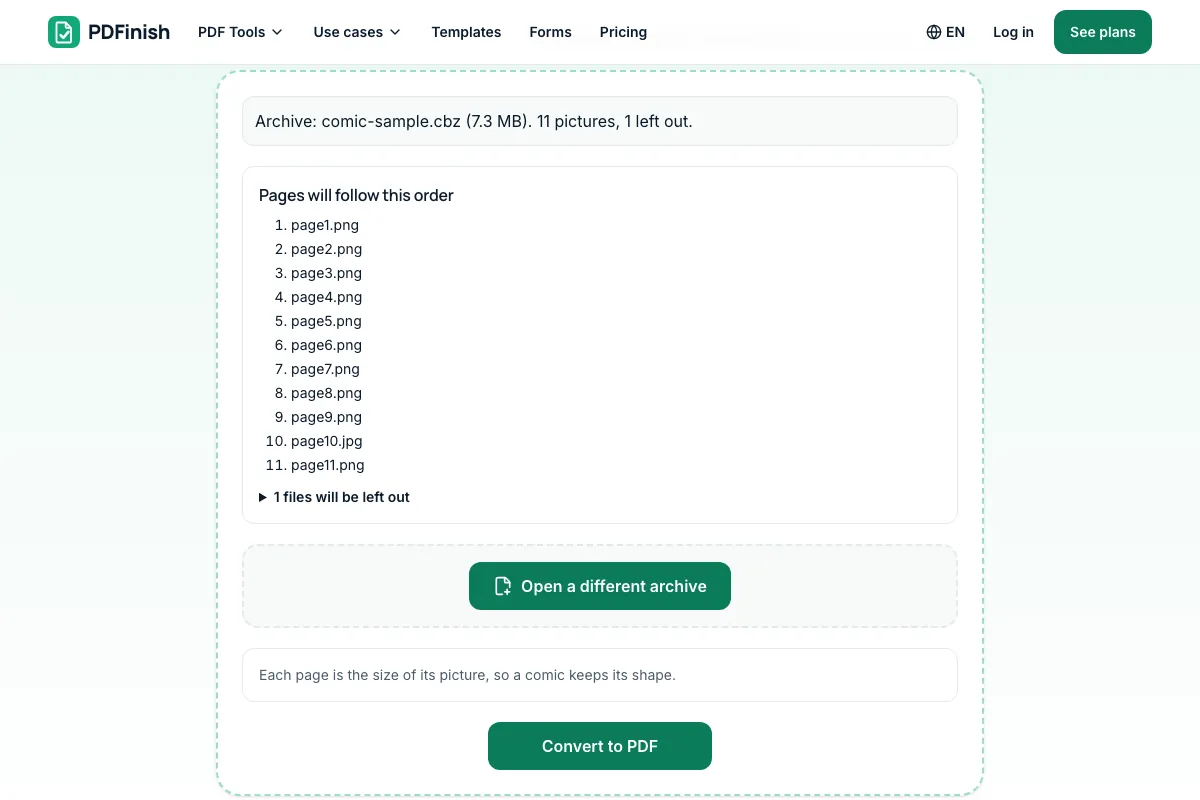
Check the page order shown, with every page in reading order.
3. Download your PDF
Save the finished PDF. Each picture is one page, sized to its picture.
What you can do in this tool
One page per picture
A CBZ is a zip of pictures. Each picture becomes one page, sized to the picture, in natural order (page2 before page10).
Order shown first
The order is shown before you convert. Files that are not pictures, such as ComicInfo.xml, are left out.
CBZ and zip files
We read .cbz and .zip files. A .cbr comic is a RAR file, which we do not read: save it as .cbz first.
Stays on your device
Your comic is opened in your browser. It is never uploaded, and nothing inside it is run.
Plain limits
Archives with a password, more than 2,000 files, or more than 500 MB unpacked are refused with a plain message.
Good to know
- Your comic is opened in your browser. It is never uploaded, and nothing inside it is run.
- A CBZ is a zip of pictures. Each picture becomes one page, sized to the picture, in natural order (page2 before page10). The order is shown before you convert.
- We read .cbz and .zip files. A .cbr comic is a RAR file, which we do not read: save it as .cbz first.
- Archives with a password, more than 2,000 files, or more than 500 MB unpacked are refused with a plain message. Files that are not pictures, such as ComicInfo.xml, are left out.
Common questions
How do I convert a CBZ to PDF?
Add the .cbz file, look over the page order, then press Convert to PDF. The file downloads from the result screen. Each picture in the comic becomes one page, sized to the picture, in natural file-name order.
What is a CBZ file?
A CBZ is a comic book archive: a zip file of page pictures, usually JPG or PNG, named so that they sort in reading order. The .cbz ending tells comic apps to open it as a book. Renaming a .cbz to .zip lets you open it with any unzip tool.
Can I convert a CBR file?
No. A .cbr comic is a RAR archive, which we do not read, and the message says so. Open it in your comic app or an unzip tool, save it again as a .cbz (a zip of the pictures), then add that file here.
In what order do the pages come out?
Natural order of the picture names, folder by folder: page2.jpg comes before page10.jpg. The order is shown before you convert so you can check it. If your comic is named page1, page2 and so on, it comes out in reading order.
Why was my CBZ refused?
A comic archive is refused if it has a password, holds more than 2,000 files, unpacks to more than 500 MB, or is damaged. These limits keep your browser from running out of memory. A very long comic can be split into two archives and converted in parts.
Is my file uploaded when I use CBZ to PDF?
No. Your comic is opened and turned into a PDF in your browser. The file is not sent to our servers.
Is CBZ to PDF free, and are there limits?
You can use it free. You get 2 free uses in total, no account needed. Free files can be up to 50 MB. Pro has no limit on uses and allows files up to 500 MB. We check the limits before a use starts, so a finished file is never held back.
Can I use CBZ to PDF on a Windows PC?
Yes. Open this page in Chrome or Edge on your PC, add your file and download the result. Nothing to install, and your file stays on your device.
More about this tool
How to convert a CBZ comic to PDF in 3 steps
To convert CBZ to PDF, add your .cbz comic, check the page order shown, and download one PDF with one page per picture, each page the size of its picture. The comic is opened in your browser and nothing is uploaded.
- 1
Add your CBZ
Drop a .cbz file onto the tool, or choose one from your device. It opens in your browser and you see every page, in reading order.
- 2
Check the page order
Pages are sorted the way people count: page2 before page10, folder by folder. Files that are not pictures are listed as left out.
- 3
Download your PDF
Save the finished file. Each picture is one page, sized to its picture, so a comic keeps its shape on a phone, tablet or e-reader.
How do I convert CBZ to PDF?
Add your .cbz comic to CBZ to PDF, check the page order, and download one PDF. Your comic is opened in your browser. It is not sent to our servers. Each picture becomes one page, sized to the picture, so the comic keeps its shape.
How do I convert CBZ to PDF for free?
Use CBZ to PDF. You get 2 free uses in total with no account, and one conversion counts as one use. Free files can be up to 50 MB each. Pro has no limit on uses and allows files up to 500 MB.
Is it safe to convert CBZ to PDF online?
With CBZ to PDF, your comic is opened inside your browser and is not sent to our servers. Nothing inside it is run. You can check this yourself in your browser's network tab while you convert, where no request carries your comic.
Does CBZ to PDF keep the page size of each picture?
Yes. Each page takes the shape of its own picture, so a wide spread stays wide and a tall page stays tall. Very large pictures are scaled down to at most 20 inches on the long side, and very small ones up to 1 inch, in proportion.
Can I convert a CBZ on my phone?
Yes. It works in the browser on a phone or tablet: choose the .cbz from your files, press Convert to PDF, and save the result. A comic with hundreds of large pictures needs a lot of memory, so it may go faster on a computer.
Can I turn a CBR into a CBZ?
A .cbr is a RAR archive and a .cbz is a zip archive. Open the .cbr in your comic app or an unzip tool, then save or zip the pictures as a .cbz. We do not read RAR files, so the comic needs to be a .cbz or .zip before you add it here.
What happens to files in the CBZ that are not pictures?
They are left out and listed with the reason before you convert. A comic archive often holds a ComicInfo.xml file with the title and credits, which is not a picture, so it is not turned into a page. Hidden system files such as .DS_Store are ignored.
Does CBZ to PDF use DRM-free comics only?
Yes. A comic you made, or a DRM-free one you bought or downloaded, is a plain zip of pictures, which we can open. Comics protected with DRM are not a plain zip and cannot be opened here, and we do not help remove that protection.
Can I make the PDF smaller or number its pages?
Yes. A comic can make a large PDF, so shrink it with Compress PDF, or add page numbers with Add Page Numbers. Both run in your browser too, so your comic still never leaves your device, and each one counts as one of your free uses.
Can I convert a ZIP of pictures instead?
Yes. A CBZ is a zip of pictures, so ZIP to PDF also works, and it can join PDFs and text files from the zip too. Use CBZ to PDF for comics, where every page should be the size of its picture, and ZIP to PDF for mixed folders.
Key facts
- Privacy: We don't sell your data. This tool runs in your browser, so your files stay on your device and are never uploaded.
- Ads: none. No third-party ads and no ad cookies.
- Limits: 2 free uses in total, no account needed, and no limit on uses with Pro. Files up to 50 MB free, 500 MB with Pro. Limits are checked before a use starts, never after.
- Price: free to start. Pro is $2.99 a month or $24 a year. Lifetime is $50 for the first 500 founders. Pro cancels in one click.
- Works on: Windows, Mac, iPhone, Android. Nothing to install.
- Your comic is opened in your browser. It is never uploaded, and nothing inside it is run.
- A CBZ is a zip of pictures. Each picture becomes one page, sized to the picture, in natural order (page2 before page10). The order is shown before you convert.
- We read .cbz and .zip files. A .cbr comic is a RAR file, which we do not read: save it as .cbz first.
- Archives with a password, more than 2,000 files, or more than 500 MB unpacked are refused with a plain message. Files that are not pictures, such as ComicInfo.xml, are left out.
Last updated:
By the PDFinish editorial team · Reviewed
Related toolsConvert
ZIP to PDF
Turn a zip of pictures and files into one PDF.
EPUB to PDF
Turn an EPUB book into a PDF, with its contents as bookmarks.
MOBI to PDF
Turn a MOBI Kindle book into a PDF.
AZW3 to PDF
Turn an AZW3 Kindle book into a PDF.
Image to PDF
Turn JPG, PNG, WebP, HEIC and more into a PDF.
JPG to PDF
Turn photos and scans into a single PDF.
Merge PDF
Combine several PDFs into one file, in the order you choose.
Compress PDF
Shrink a PDF so it is easier to email and upload.
PDF Reader
Open and read a PDF in your browser. Nothing is uploaded.