Bates numbering for PDFs
Stamp one or more PDFs with Bates numbers and get a CSV log.
or drop them here. PDF files up to 50 MB
Your file stays on your device. Nothing is uploaded unless you choose Email it to me.
- 2 free uses in total, no account needed
- No ads
- Nothing to install
How it works
1. Add your PDFs
Choose them from your device or drop them on the page.
2. Set the number
Set a prefix, a start number and the digits.
3. Download the stamped files and the log
Save a zip of numbered PDFs, or one merged PDF, plus the log.
What you can do in this tool
Prefix, suffix, digits
Set a prefix, a suffix, the start number and how many digits to pad to (6 gives 000001).
Numbers carry on
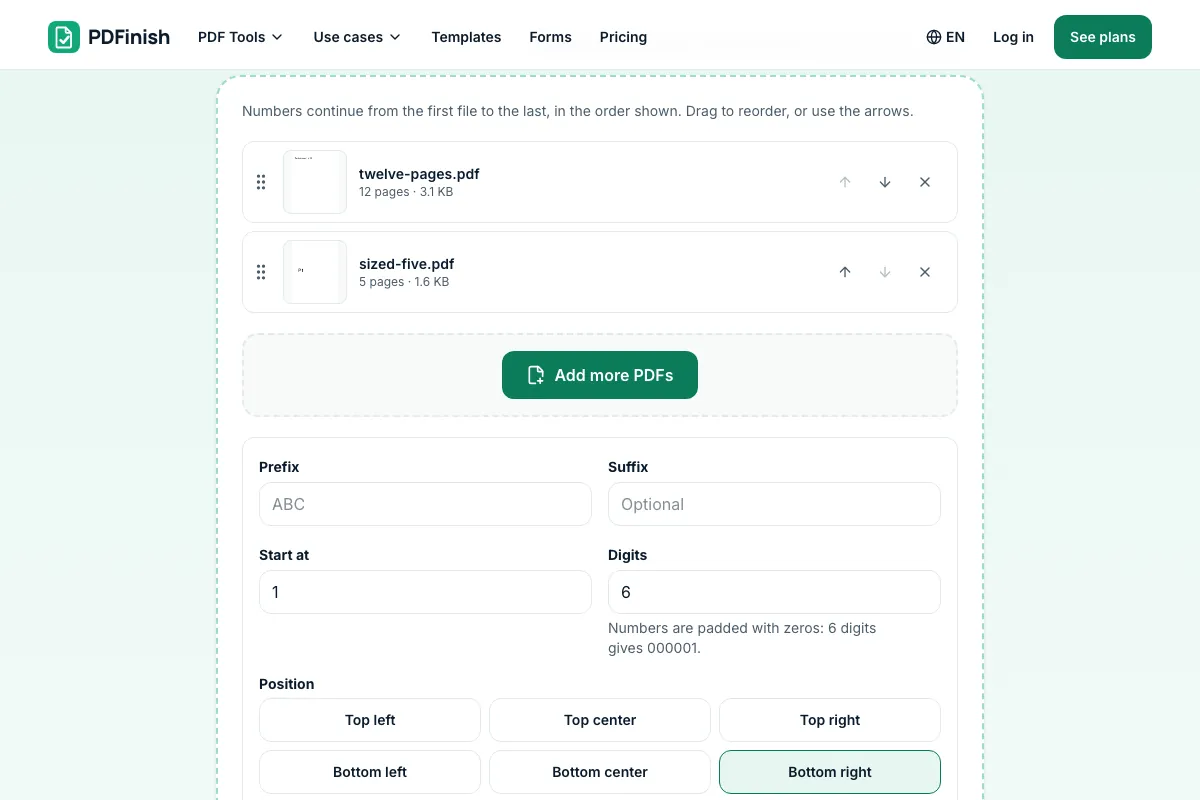
Numbers continue from the first file to the last, in the order shown.
Six places on the page
Choose one of six places, the margin, the text size and a color.
CSV log
A log with file name, first number, last number and pages comes either way.
Stays on your device
Your PDFs are stamped in your browser.
Good to know
- Numbers continue across files in the order shown, and you can reorder the files before you stamp.
- The CSV log lists each file with its first number, last number and pages.
- Your PDFs are stamped in your browser.
Common questions
How do I Bates stamp PDF files?
Add the PDF, type a prefix and a start number, choose the position and press Add Bates numbers. Each page gets the next number in the series, such as ABC000001, ABC000002 and so on. With several PDFs, the numbers carry on from one file to the next.
Do the numbers continue from one file to the next?
Yes. Files are numbered in the order shown. If the first file has 12 pages starting at 1, the second file starts at 13. Drag the files or use the arrows to change the order before you stamp. The range for every file is listed on screen.
What does the CSV log contain?
One row for each file with its name, first number, last number and page count, like the index a law office keeps. It downloads next to your stamped files and is also inside the zip. It opens in Excel, Numbers and Google Sheets.
Can I choose the prefix, number of digits and position?
Yes. Set a prefix and a suffix, a start number, and 1 to 12 digits (padded with zeros, so 6 digits gives 000001). Pick one of six places, a margin from the edge, a text size of 6 to 36 points and black, red or blue. A date line is optional.
Can I get one merged PDF instead of separate files?
Yes. With two or more files, choose One merged PDF and you get a single stamped file with the numbers running through it. Choose Separate PDFs in a .zip to keep each file apart, each named by its range, such as ABC000001-ABC000012.pdf.
Is my file uploaded when I use Bates Numbering?
No. Your PDFs are stamped in your browser. The file is not sent to our servers.
Is Bates Numbering free, and are there limits?
You can use it free. You get 2 free uses in total, no account needed. Free files can be up to 50 MB. Pro has no limit on uses and allows files up to 500 MB. We check the limits before a use starts, so a finished file is never held back.
Can I use Bates Numbering on a Windows PC?
Yes. Open this page in Chrome or Edge on your PC, add your file and download the result. Nothing to install, and your file stays on your device.
More about this tool
How to Bates stamp a PDF in 3 steps
To Bates stamp PDF files, add one or more PDFs, set a prefix, a start number and the digits, and download the stamped copies with a CSV log of each file's range. Numbers continue from file to file, and your files stay in your browser.
- 1
Add your PDFs
Drop one or more PDFs onto the tool, or choose them from your device. Put them in the order the numbers should run; Bates numbers continue from the first file to the last.
- 2
Set the number
Type a prefix such as ABC, the start number and the digits, and pick where on the page the number goes. The ranges for every file are listed before you stamp, and a preview shows the first page.
- 3
Download the stamped files and the log
Save a zip of separate PDFs named by range, or one merged PDF. The CSV log lists each file with its first number, last number and pages, so you have the index.
How do I Bates stamp a PDF?
Add your PDFs to Bates Numbering, type a prefix and a start number, choose where the number goes, and download the stamped copies. The numbers run on from one file to the next. A CSV log lists each file's first and last number. Your files are stamped in your browser.
How do I add Bates numbers to PDF files for free?
Use Bates Numbering. You get 2 free uses in total with no account, and one finished stamping counts as one use, however many PDFs it covers. Free files can be up to 50 MB each. Pro has no limit on uses and allows files up to 500 MB.
What is Bates numbering?
Bates numbering gives every page in a set of documents a unique, running identifier, such as ABC000001. Law offices use it for exhibits and productions so each page can be cited and found. A prefix names the case or the party, and the number is padded with zeros to a fixed length.
What does a Bates number look like?
A prefix followed by a number padded with zeros, for example ABC000001, ABC000002. Some add a suffix. The prefix is usually the case, client or producing party, and six or seven digits is common. In Bates Numbering you set the prefix, suffix and digits yourself.
Can I keep numbering across several PDFs?
Yes. Add all the PDFs, put them in order, and the numbers continue from the last page of one file to the first page of the next. The tool lists each file's range before you stamp, and the CSV log records it, so the production has a clean index.
Is it safe to Bates stamp confidential documents online?
With Bates Numbering your PDFs are stamped inside your browser and are not sent to our servers, which suits confidential files. You can check this in your browser's network tab while you stamp: no request carries your files. Still follow your own firm's rules for client documents.
Where do the Bates numbers go on the page?
Bottom right by default, which is where most productions put them. You can choose any of six places: top or bottom, left, center or right. Set the margin from the edge, the text size and the color, and check the preview of the first page before you save.
Can I add a date next to the Bates number?
Yes. Tick Add a date line and a second small line, today's date by default, is printed next to each number. You can edit the text, for example to a production date. It is optional, and the number is the same with or without it.
Can I Bates stamp on my phone?
Yes. It works in the browser on a phone or tablet. Choose the PDFs, set the prefix and start number, and save the zip or the merged PDF. A set of very large PDFs needs a lot of memory, so it may go faster on a computer.
What if I need to number pages without a prefix?
Leave the prefix empty and you get plain padded numbers, such as 000001. For simple page numbers like Page 1 of 10, use Add Page Numbers. To print a date or a title on every page, use Add Header and Footer.
Key facts
- Privacy: We don't sell your data. This tool runs in your browser, so your files stay on your device and are never uploaded.
- Ads: none. No third-party ads and no ad cookies.
- Limits: 2 free uses in total, no account needed, and no limit on uses with Pro. Files up to 50 MB free, 500 MB with Pro. Limits are checked before a use starts, never after.
- Price: free to start. Pro is $2.99 a month or $24 a year. Lifetime is $50 for the first 500 founders. Pro cancels in one click.
- Works on: Windows, Mac, iPhone, Android. Nothing to install.
- Your PDFs are stamped in your browser. They are never uploaded.
- Numbers continue across files in the order shown, and you can reorder the files before you stamp.
- Set a prefix, a suffix, the start number and how many digits to pad to (6 gives 000001). Choose one of six places, the margin, the text size and a color. A date line is optional.
- You get separate PDFs in a .zip, each named by its range (ABC000001-ABC000012.pdf), or one merged PDF. A CSV log with file name, first number, last number and pages comes either way.
Last updated:
By the PDFinish editorial team · Reviewed
Related toolsEdit
Add Page Numbers to PDF
Stamp page numbers onto every page of a PDF.
Add Header and Footer
Print text, dates and page numbers top and bottom.
Merge PDF
Combine several PDFs into one file, in the order you choose.
Add Watermark to PDF
Place text such as DRAFT or CONFIDENTIAL on pages.
Organize PDF
Drag page thumbnails to reorder, rotate or remove pages.
Compress PDF
Shrink a PDF so it is easier to email and upload.