Put multiple pages on one sheet
Put 2, 4, 6, 9 or 16 pages on each sheet, then save.
or drop it here. PDF files up to 50 MB
Your file stays on your device. Nothing is uploaded unless you choose Email it to me.
- 2 free uses in total, no account needed
- No ads
- Nothing to install
How it works
1. Add your PDF
Choose it from your device or drop it on the page.
2. Choose the layout
Pick pages per sheet, the order, and the sheet size.
3. Save the new PDF
Save the new PDF and print it as normal.
What you can do in this tool
2 to 16 per sheet
Choose 2, 4, 6, 9 or 16 pages per sheet.
Text stays text
Pages are placed as they are, so the words can still be selected and searched.
Set the sheet
Set the sheet size, margin, spacing and a thin border.
Pick the order
Across then down, or down then across.
Stays on your device
Your file is laid out in your browser.
Good to know
- Nine pages at 4 per sheet make 3 sheets, with the last one partly empty.
- Links and form fields do not carry over.
- A PDF with a password needs to be unlocked first.
Common questions
How do I put multiple pages on one sheet in a PDF?
Add the PDF, choose how many pages go on each sheet, and press Put pages on sheets. You get a new PDF where each sheet holds that many of your pages, in the order you picked. The original is not changed.
What is N-up printing?
N-up means N pages on one sheet. 2-up puts two pages side by side, 4-up makes a 2 by 2 grid. It saves paper and gives a small overview of a document. Each page is made smaller to fit its place.
Will the text stay sharp and searchable?
Yes. The pages are placed in the new file as they are, not turned into pictures, so text stays text and the file stays small. The words are smaller on the sheet, so 9 and 16 per sheet suit overviews more than fine print.
Why are my pages not the same size as the sheet?
Each page is scaled to fit its place on the sheet and centered, so a page with a different shape leaves some white space. Pages of mixed sizes each get the same size space. Choose Best fit, a different sheet size, or a smaller margin to make them larger.
Do links and form fields still work?
No. The pages are placed as plain page content, so links and form fields do not carry over. If you need a filled form on the sheet, flatten it first with Flatten PDF.
Is my file uploaded when I use Multiple Pages per Sheet?
No. Your pages are placed on sheets in your browser. The file is not sent to our servers.
Is Multiple Pages per Sheet free, and are there limits?
You can use it free. You get 2 free uses in total, no account needed. Free files can be up to 50 MB. Pro has no limit on uses and allows files up to 500 MB. We check the limits before a use starts, so a finished file is never held back.
Can I use Multiple Pages per Sheet on a Windows PC?
Yes. Open this page in Chrome or Edge on your PC, add your file and download the result. Nothing to install, and your file stays on your device.
More about this tool
How to put multiple pages on one sheet of a PDF in 3 steps
To put multiple pages on one sheet, add the PDF, choose 2, 4, 6, 9 or 16 pages per sheet, pick the sheet size and press Put pages on sheets. The pages are placed as they are, so the text stays text, and the file stays on your device.
- 1
Add your PDF
Drop the document onto the tool, or choose it from your device. A PDF with a password needs to be unlocked first.
- 2
Choose the layout
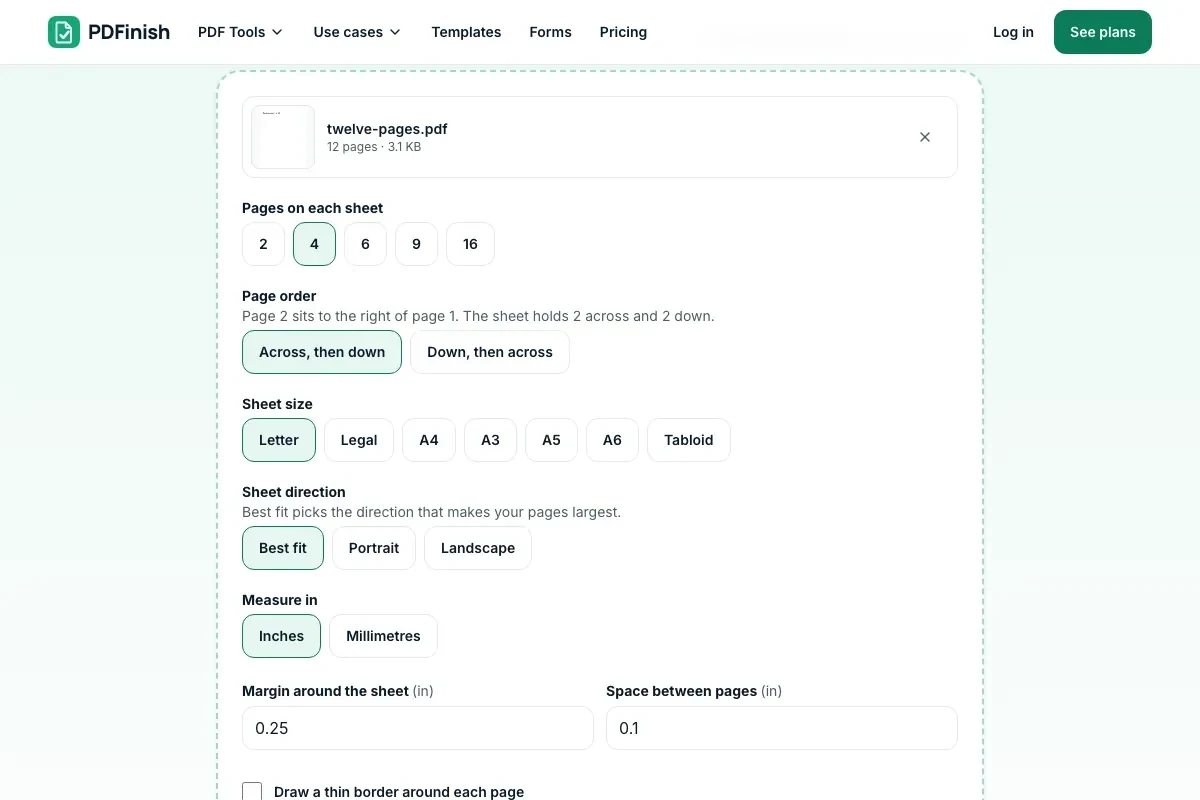
Pick 2, 4, 6, 9 or 16 pages per sheet, the order, the sheet size and direction. Set a margin, the space between pages and a border if you want them.
- 3
Save the new PDF
Press Put pages on sheets and download the file. Print it as normal: each sheet already holds several pages.
Key facts
- Privacy: We don't sell your data. This tool runs in your browser, so your files stay on your device and are never uploaded.
- Ads: none. No third-party ads and no ad cookies.
- Limits: 2 free uses in total, no account needed, and no limit on uses with Pro. Files up to 50 MB free, 500 MB with Pro. Limits are checked before a use starts, never after.
- Price: free to start. Pro is $2.99 a month or $24 a year. Lifetime is $50 for the first 500 founders. Pro cancels in one click.
- Works on: Windows, Mac, iPhone, Android. Nothing to install.
- Choose 2, 4, 6, 9 or 16 pages per sheet. Nine pages at 4 per sheet make 3 sheets, with the last one partly empty.
- Order is across then down (page 2 beside page 1) or down then across (page 2 below page 1).
- Pages are placed as they are, not turned into pictures, so the words can still be selected and searched. Links and form fields do not carry over.
- Best fit picks portrait or landscape, whichever draws your pages larger. You can also set the sheet size, margin, spacing and a thin border.
Last updated:
By the PDFinish editorial team · Reviewed
Related toolsOrganize
Resize PDF
Change the page size to Letter, A4, Legal and more.
Organize PDF
Drag page thumbnails to reorder, rotate or remove pages.
Crop PDF
Crop pages to a box you draw, or trim the white margins.
Grayscale PDF
Turn pages grey to print in black and white.
Merge PDF
Combine several PDFs into one file, in the order you choose.