isolved COBRA form: how to fill out, sign and send it
isolved says it mails the COBRA election notice to your last known address and processes the election forms that people send back. If your notice came with a PDF form, fill it in, sign it and download it here, then return it the way the notice says.
Last updated:
We don't sell your data. This tool runs in your browser, so your files stay on your device and are never uploaded.
What isolved says about electing COBRA
isolved says its continuation services manage the delivery of election notices, track eligibility, collect premium payments and give plan participants and HR teams one point of contact.
Source: isolved HCM, Continuation Services (read October 27, 2026)
Its continuation page says that to use continuation benefits you must complete the enrollment process by the deadline outlined in your election notice.
Source: isolved HCM, Continuation Services (read October 27, 2026)
Its service agreement says isolved Benefit Services sends its standard election notice to the last known address of each qualified beneficiary, and that it may send a single election notice and form when everyone lives at the same address.
Source: isolved Benefit Services, COBRA appendix to the service agreement (read October 27, 2026)
The same agreement says that, where the employer has chosen premium collection, isolved processes the election forms that qualified beneficiaries submit.
Source: isolved Benefit Services, COBRA appendix to the service agreement (read October 27, 2026)
The two isolved pages we read do not say how to return an election form, and they do not describe an online election route. They are written for employers, and the services they list apply only as far as each employer chose them, so your own notice is the guide for your case.
Your election notice has your own address, phone numbers and dates. We do not list them, so use the ones in your notice.
Fill out and sign a PDF isolved election form
These steps are for an isolved election form that reached you as a PDF, for example attached to an email.
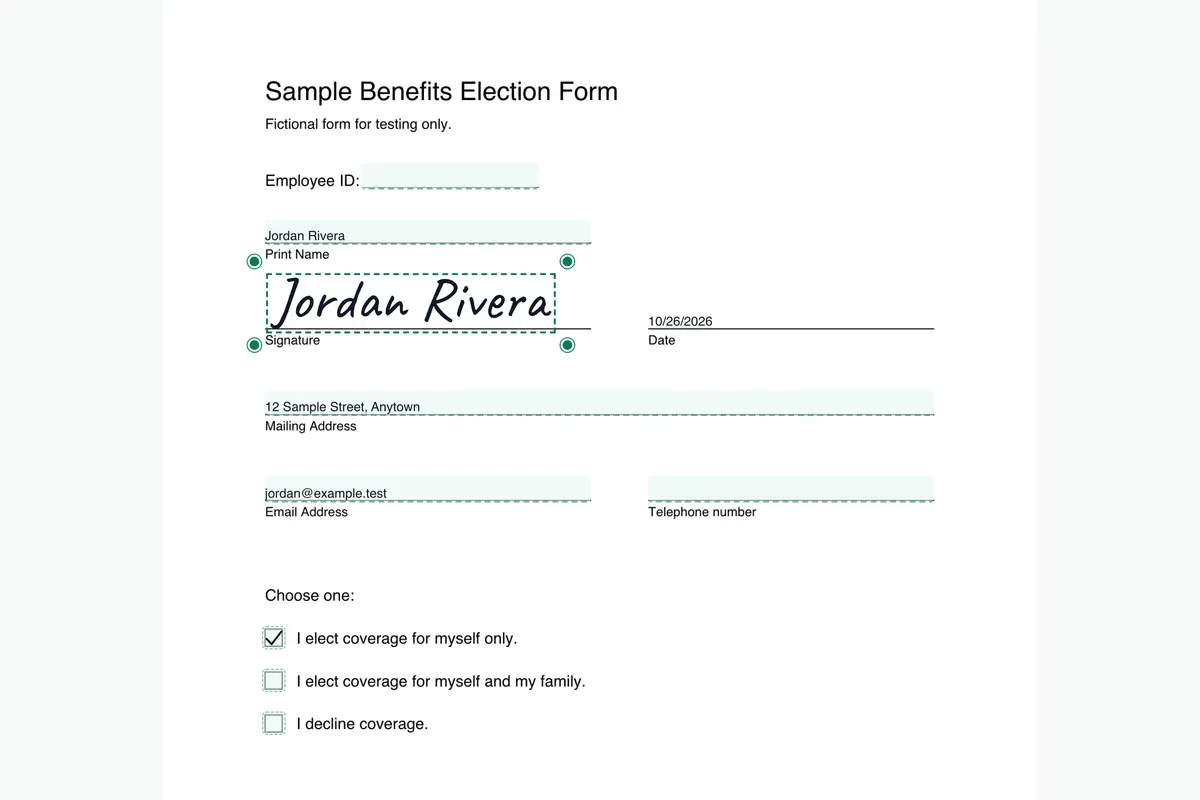
Open the form. Drop the PDF from your isolved election notice onto Fill and Sign PDF. If the form has no fillable fields, the tool lets you type on the page instead.
Fill in your section. Type your details on the lines. If one notice covers several family members, check which names the form lists before you type.
Sign and date. Draw or type your signature, place it on the signature line and add the date.
Download and send. Save the file with a clear name. Return it the way your isolved notice tells you, and do not guess a different route.
More detail is in our guide to how to fill out and sign a COBRA election form.
What to keep
- The isolved election notice, since its deadline is the one that applies to you.
- The signed PDF, saved where you can find it.
- A record of how and when you returned the form, such as a sent email or a mail receipt.
Federal timing, from the Department of Labor
- The Department of Labor says that if you qualify for COBRA continuation coverage, you have at least 60 days to decide whether to enroll.
- It says the 60-day election period begins on the later of two dates: the date the plan provides the election notice, which may be the date it is mailed, or the date you would otherwise lose coverage.
- It also says plans must give you at least 45 days to make your first payment.
Source: U.S. Department of Labor, A Worker's Guide to Health Benefits Under COBRA (read October 27, 2026). Your election notice has your actual dates.
Questions about the isolved COBRA form
Does isolved take COBRA elections online?
The isolved pages we read describe a mailed notice and processed election forms, and they do not describe an online route. If your notice gives a web address or login, use it.
Where does isolved send the election notice?
Its service agreement says it sends the notice to the last known address of each qualified beneficiary. When everyone shares an address, it may send one notice and one form.
Is the isolved service agreement the same as my employer's setup?
No. The agreement lists services that an employer can choose. Which ones apply to you depends on your employer, so follow your own notice.
Can I email my isolved election form?
We did not find an isolved page that says how to return the form. Use the method named in your notice, and ask the administrator if it is unclear.
More COBRA form pages
Sources
- isolved HCM, Continuation Services: isolvedhcm.com/benefits/continuation (read October 27, 2026)
- isolved Benefit Services, COBRA appendix to the service agreement: isolvedbenefitservices.com/legal/cobra-appendix (read October 27, 2026)
- U.S. Department of Labor, A Worker's Guide to Health Benefits Under COBRA: dol.gov/agencies/ebsa/about-ebsa/our-activities/resource-center/publications/workers-guide-health-benefits-cobra (read October 27, 2026)
PDFinish is not affiliated with isolved. We describe what isolved says on its own public pages, and we do not host or change its forms.
General information, not legal, tax or insurance advice.