Benefit Resource COBRA form: how to fill out, sign and send it
Benefit Resource says the administrator sends paperwork and an election form with the COBRA Specific Rights Notice. If yours arrived as a PDF, fill it in, sign it and download it here, then return it as your notice says.
Last updated:
We don't sell your data. This tool runs in your browser, so your files stay on your device and are never uploaded.
What Benefit Resource says about electing COBRA
Benefit Resource's New to COBRA page says that after a qualifying event the employer gives the third-party administrator the required information, so the administrator can send the member paperwork and an election form, the Specific Rights Notice.
Source: Benefit Resource, New to COBRA (read October 27, 2026)
It says the Specific Rights Notice is also called a COBRA qualifying event letter or election notice.
Source: Benefit Resource, New to COBRA (read October 27, 2026)
It says that notice reviews how to elect COBRA coverage, pay premiums and end coverage.
Source: Benefit Resource, New to COBRA (read October 27, 2026)
It says a takeover notice, sent when it takes over administration, helps members get online so they can pay premiums and make an initial election if one is pending.
Source: Benefit Resource, New to COBRA (read October 27, 2026)
The page says people can elect each benefit separately, and gives the example of electing COBRA only for dental coverage while using the Federal Exchange for health coverage.
Source: Benefit Resource, New to COBRA (read October 27, 2026)
The site menu lists a COBRA and Direct Bill portal for participants.
Source: Benefit Resource, New to COBRA (read October 27, 2026)
The page we read does not say how to return the election form, and it does not say the form comes as a PDF. Which options your plan offers is in your notice.
Your election notice has your own address, phone numbers and dates. We do not list them, so use the ones in your notice.
Fill out and sign a PDF Benefit Resource election form
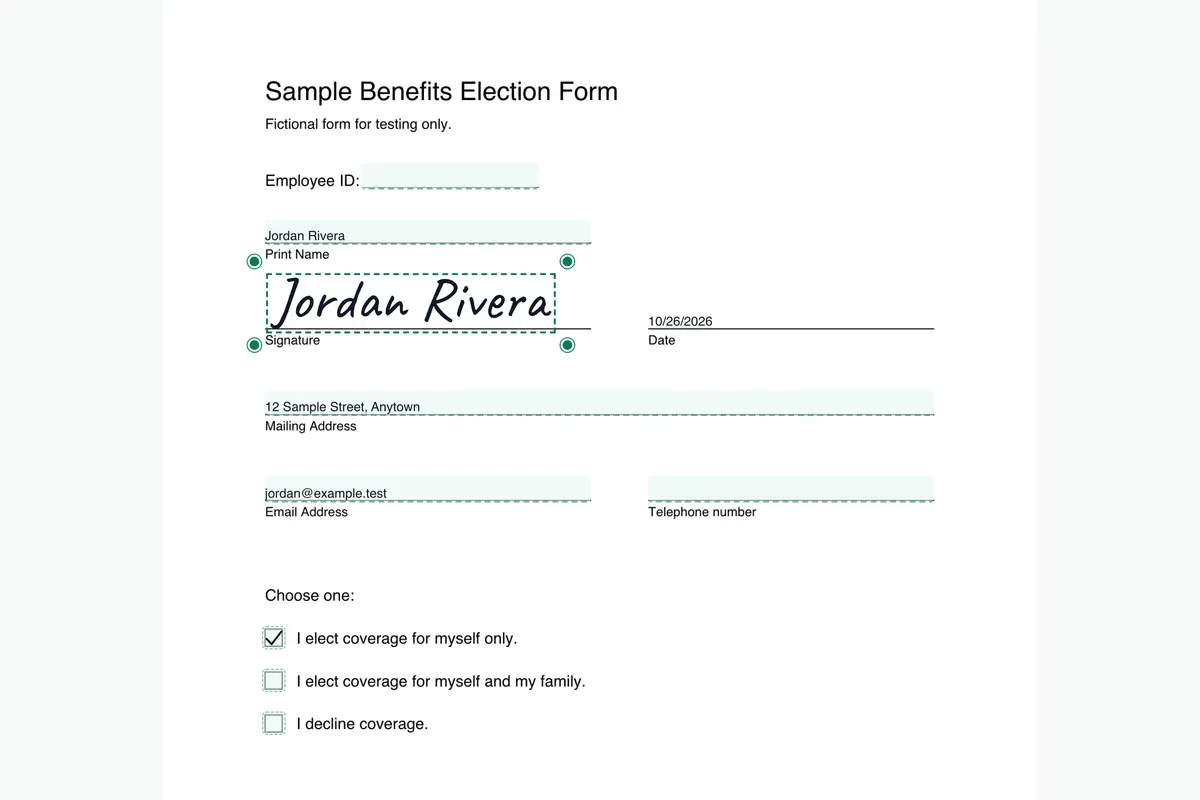
These steps are for the election form from a Benefit Resource Specific Rights Notice, once it is in your hands as a PDF.
Open the notice package. Find the election form that came with the Specific Rights Notice, then drop it onto Fill and Sign PDF.
Fill in the election. Type your details and mark the choices on the lines the form gives you. Take your time with any box that applies to a single benefit.
Sign and date. Add your signature and the date, then check that no required line is blank.
Download and return it. Save the signed PDF and send it as the notice instructs. Benefit Resource's page leaves the method to the notice, so do the same.
More detail is in our guide to how to fill out and sign a COBRA election form.
What to keep
- The Specific Rights Notice itself, which explains how to elect and pay.
- The signed election form as a PDF.
- A record of the day and method you used to return it.
Federal timing, from the Department of Labor
- The Department of Labor says that if you qualify for COBRA continuation coverage, you have at least 60 days to decide whether to enroll.
- It says the 60-day election period begins on the later of two dates: the date the plan provides the election notice, which may be the date it is mailed, or the date you would otherwise lose coverage.
- It also says plans must give you at least 45 days to make your first payment.
Source: U.S. Department of Labor, A Worker's Guide to Health Benefits Under COBRA (read October 27, 2026). Your election notice has your actual dates.
Questions about the Benefit Resource COBRA form
What is the Specific Rights Notice at Benefit Resource?
Its page calls it the notice a qualified beneficiary gets after a qualifying event, also known as a COBRA qualifying event letter or election notice. It explains how to elect, pay and end coverage.
Who sends the Benefit Resource election form?
The page says the employer informs the third-party administrator, which then sends the member paperwork and an election form.
Does Benefit Resource have a COBRA portal?
Its site menu lists a COBRA and Direct Bill portal, and a takeover notice is described as helping members get online to pay and make a pending initial election.
Can I elect only some benefits at Benefit Resource?
Its training page says each benefit can be elected separately, with dental as its example. Your own notice lists the choices your plan offers.
More COBRA form pages
Sources
- Benefit Resource, New to COBRA: benefitresource.com/resources/new-to-cobra/ (read October 27, 2026)
- U.S. Department of Labor, A Worker's Guide to Health Benefits Under COBRA: dol.gov/agencies/ebsa/about-ebsa/our-activities/resource-center/publications/workers-guide-health-benefits-cobra (read October 27, 2026)
PDFinish is not affiliated with Benefit Resource. We describe what Benefit Resource says on its own public pages, and we do not host or change its forms.
General information, not legal, tax or insurance advice.