Mileage log
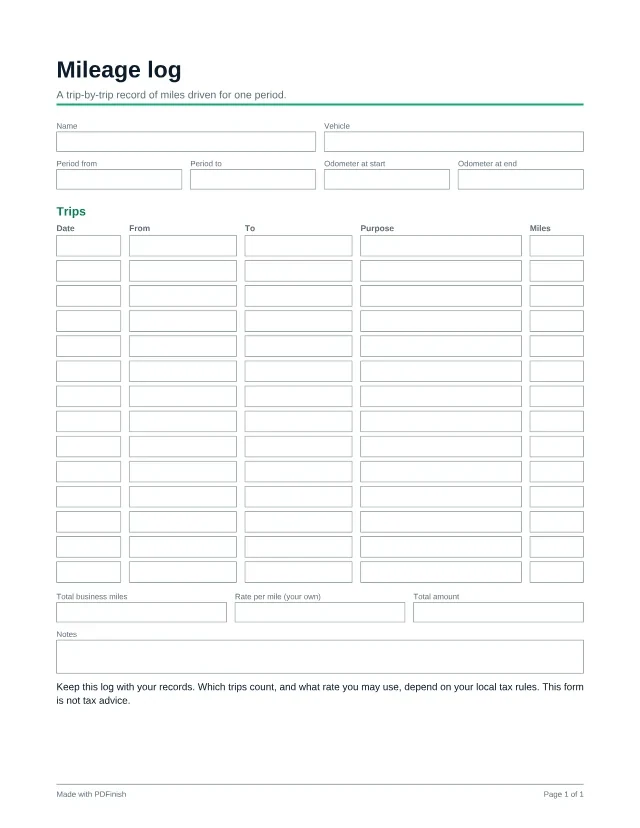
This fillable mileage log records up to 14 trips with the date, where you went, why and the miles, plus your odometer readings and a total for the period. Fill it in as you go and keep it with your records. Filling in any template is free and needs no account: you type your answers in the browser and download the finished PDF. The blank PDF is free to download once, and every blank template is in Pro.
Last updated:
Fill in any template free, no account. One blank download is free, then Pro.
Popular with freelancers and bookkeepers. See PDF tools and templates for freelancers and for bookkeepers.
Wording last reviewed by the PDFinish team on . This is not a review by a lawyer.
What this template is for
- A freelancer tracking miles driven to client meetings
- Keeping a record of trips for reimbursement from a client or employer
- A monthly or quarterly log to hand to a bookkeeper
What is included
80 fillable fields, on US Letter paper.
Details
- Name
- Vehicle
- Period from
- Period to
- Odometer at start
- Odometer at end
Trips
- 14 rows of: Date, From, To, Purpose, Miles
- Total business miles
- Rate per mile (your own)
- Total amount
- Notes
How to use it in 3 steps
Open it
Choose Fill it in free. No account is needed, and the template opens straight in our Fill PDF tool, with no download needed. You can also download the blank PDF once for free and open it in any PDF reader.
Type into the boxes
Click a box and type, or tick a checkbox. Write the purpose of each trip when you take it. Notes made at the time are easier to trust than ones rebuilt later.
Sign and save
When you finish, enter your email: the download starts and we send you a link to the finished file. To sign it, open it in Sign PDF, or print it and sign by hand. Your file stays on your device unless you ask us to email it.
Work out the numbers first: Mileage reimbursement calculator.
Questions about this template
What rate per mile should I use?
That depends on your local tax rules, and on whether you are claiming a deduction or being reimbursed. The rate box is yours to fill in. Check your tax authority's current guidance or ask a tax professional. This template is not tax advice.
Which trips count as business miles?
The rules differ by place and situation, and this form does not decide it. Write down every trip you may want to claim, with its purpose, and ask a tax professional what counts.
Does the log add up the miles?
No. Type the total yourself in the Total business miles box and check it against your trips.
Is this template free?
Filling it in is free, and you do not need an account. You type your answers in your browser and download the finished PDF. The blank PDF is free to download once; after that, Pro, Lifetime and Team unlock every blank template.
What if I only want the blank PDF?
One blank download is free for each visitor. After that, Pro gives you every blank template, plus unlimited uses. You can still fill any template in free.
Does PDFinish see what I type?
Not while you fill it in. The template opens and fills in your browser. If you ask us to email the finished file, it goes through our server, stays encrypted for 7 days so the link works, and is then deleted.
More templates
- Expense report
List expenses by date and category, total them, and get them signed off.
- Freelance invoice
A clean invoice with line items, tax and payment details.
- Project quote or estimate
Price a job before you start: scope, line items and an acceptance box.