Expense report
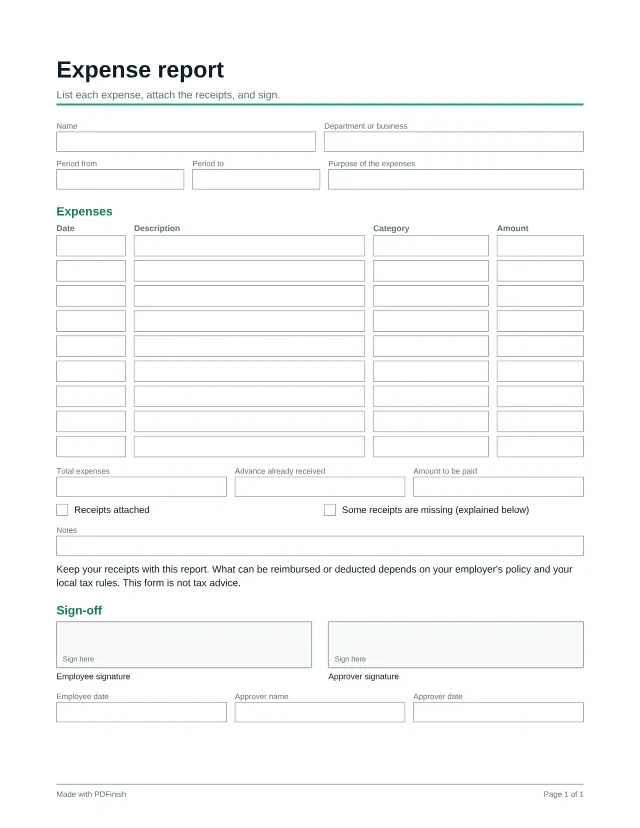
This fillable expense report has 9 lines for the date, description, category and amount of each expense, plus a total, an advance box and signatures for the person claiming and the person approving. Attach your receipts and send it. Filling in any template is free and needs no account: you type your answers in the browser and download the finished PDF. The blank PDF is free to download once, and every blank template is in Pro.
Last updated:
Fill in any template free, no account. One blank download is free, then Pro.
Popular with freelancers, bookkeepers and small business. See PDF tools and templates for freelancers, for bookkeepers and for small business.
Wording last reviewed by the PDFinish team on . This is not a review by a lawyer.
What this template is for
- An employee claiming back money spent for work
- A small business collecting month-end expenses for the bookkeeper
- A volunteer or board member reporting costs for reimbursement
What is included
50 fillable fields and 2 signature areas, on US Letter paper.
Details
- Name
- Department or business
- Period from
- Period to
- Purpose of the expenses
Expenses
- 9 rows of: Date, Description, Category, Amount
- Total expenses
- Advance already received
- Amount to be paid
- Receipts attached
- Some receipts are missing (explained below)
- Notes
Sign-off
- Employee date
- Approver name
- Approver date
How to use it in 3 steps
Open it
Choose Fill it in free. No account is needed, and the template opens straight in our Fill PDF tool, with no download needed. You can also download the blank PDF once for free and open it in any PDF reader.
Type into the boxes
Click a box and type, or tick a checkbox. Add up the amounts and type the total yourself, then check it against your receipts before you sign.
Sign and save
When you finish, enter your email: the download starts and we send you a link to the finished file. To sign it, open it in Sign PDF, or print it and sign by hand. Your file stays on your device unless you ask us to email it.
Useful next: Fill PDF, Merge PDF, JPG to PDF, Compress PDF.
Questions about this template
Does the form add up the amounts?
No. Type the total yourself in the Total expenses box and check it against your receipts. The invoice and the purchase order templates are the ones that add up for you.
Which expenses can be reimbursed or deducted?
That is set by your employer's policy and your local tax rules, not by this form. It is a general template, not tax advice. Ask your employer, a bookkeeper or a tax professional.
What if I need more than 9 lines?
Fill in a second copy and join the files with Merge PDF. Put the receipts after them in the same file.
Is this template free?
Filling it in is free, and you do not need an account. You type your answers in your browser and download the finished PDF. The blank PDF is free to download once; after that, Pro, Lifetime and Team unlock every blank template.
What if I only want the blank PDF?
One blank download is free for each visitor. After that, Pro gives you every blank template, plus unlimited uses. You can still fill any template in free.
Does PDFinish see what I type?
Not while you fill it in. The template opens and fills in your browser. If you ask us to email the finished file, it goes through our server, stays encrypted for 7 days so the link works, and is then deleted.
More templates
- Mileage log
A trip-by-trip log of dates, places, purposes and miles for one period.
- Payment receipt
Proof that a payment was received, for any sale or service.
- Purchase order
Order goods or services from a vendor: items, quantities, prices and delivery details.