Purchase order
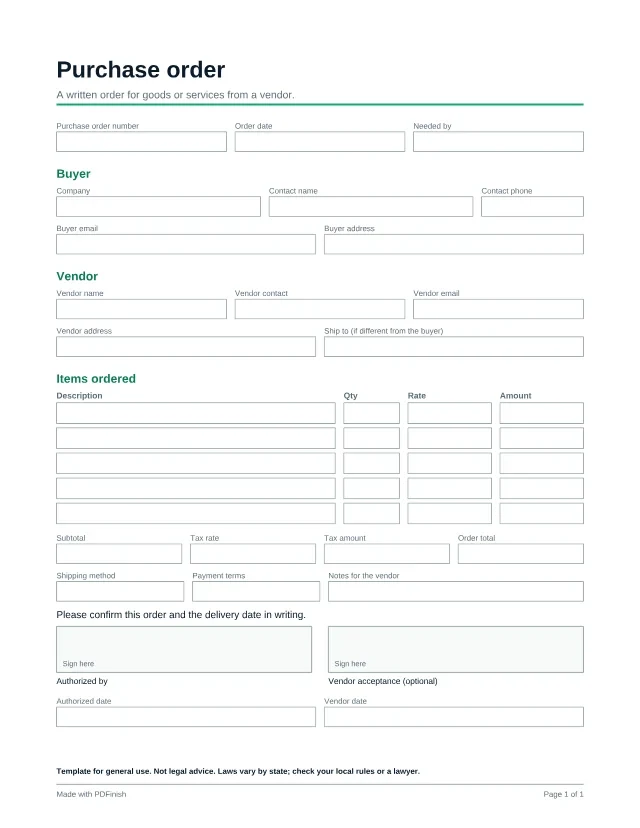
This fillable purchase order tells a vendor what you want to buy, how many, at what price and where to send it. Type the quantity and rate for each line and the amounts, subtotal, tax and order total are worked out as you type. Filling in any template is free and needs no account: you type your answers in the browser and download the finished PDF. The blank PDF is free to download once, and every blank template is in Pro.
Last updated:
Fill in any template free, no account. One blank download is free, then Pro.
Popular with freelancers and small business. See PDF tools and templates for freelancers and for small business.
Template for general use. Not legal advice. Laws vary by state; check your local rules or a lawyer.
Wording last reviewed by the PDFinish team on . This is not a review by a lawyer.
What this template is for
- A small business ordering parts or supplies from a vendor
- Giving an approver a written record of what was ordered
- Matching an order to a later invoice and delivery
What is included
42 fillable fields and 2 signature areas, on US Letter paper.
Details
- Purchase order number
- Order date
- Needed by
Buyer
- Company
- Contact name
- Contact phone
- Buyer email
- Buyer address
Vendor
- Vendor name
- Vendor contact
- Vendor email
- Vendor address
- Ship to (if different from the buyer)
Items ordered
- 5 rows of: Description, Qty, Rate, Amount
- Subtotal
- Tax rate
- Tax amount
- Order total
- Shipping method
- Payment terms
- Notes for the vendor
- Authorized date
- Vendor date
How to use it in 3 steps
Open it
Choose Fill it in free. No account is needed, and the template opens straight in our Fill PDF tool, with no download needed. You can also download the blank PDF once for free and open it in any PDF reader.
Type into the boxes
Click a box and type, or tick a checkbox. Type the quantity, the rate and the tax rate, and the amounts, subtotal, tax and order total fill in for you. You can type over any of them.
Sign and save
When you finish, enter your email: the download starts and we send you a link to the finished file. To sign it, open it in Sign PDF, or print it and sign by hand. Your file stays on your device unless you ask us to email it.
Questions about this template
Does the purchase order add up the totals?
Yes, when you fill it in with PDFinish (Fill it in free, or Fill PDF). Type the quantity and rate for each line and the tax rate, and the amounts, subtotal, tax amount and order total are worked out as you type. The numbers are written into the boxes, so the saved PDF shows them in any viewer. If you fill the blank PDF in another app, that app will not add anything up, so check the sums there.
Is a purchase order a contract?
It can form part of one once a vendor accepts it, but that depends on the terms and on local law. This is a general template, not legal advice. Ask the vendor how they treat purchase orders, and ask a lawyer about anything large.
Can I add more than five lines?
Not on this page. For a longer order, fill it twice and combine the files with Merge PDF.
Is this template free?
Filling it in is free, and you do not need an account. You type your answers in your browser and download the finished PDF. The blank PDF is free to download once; after that, Pro, Lifetime and Team unlock every blank template.
What if I only want the blank PDF?
One blank download is free for each visitor. After that, Pro gives you every blank template, plus unlimited uses. You can still fill any template in free.
Does PDFinish see what I type?
Not while you fill it in. The template opens and fills in your browser. If you ask us to email the finished file, it goes through our server, stays encrypted for 7 days so the link works, and is then deleted.
More templates
- Project quote or estimate
Price a job before you start: scope, line items and an acceptance box.
- Freelance invoice
A clean invoice with line items, tax and payment details.
- Sign in sheet
A printable visitor sign-in sheet for an office or front desk: name, company, who they are visiting, time in and time out.