Simple freelance services agreement
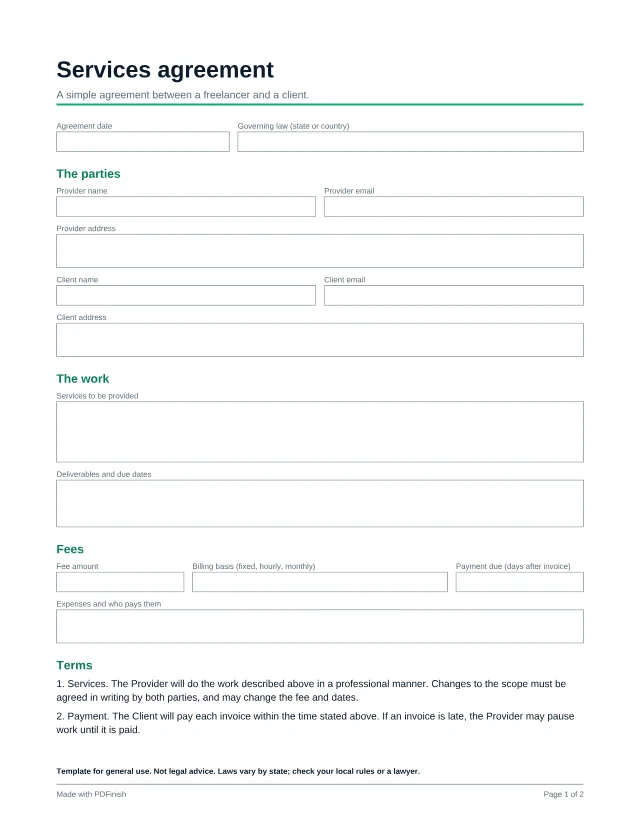
This free fillable services agreement covers scope, fees, ownership, confidentiality and ending the work, in plain language. Fill in the blanks, sign, and keep a copy each.
3 free templates with a free account; every template with Pro.
Popular with freelancers. See PDF tools and templates for freelancers.
Template for general use. Not legal advice. Laws vary by state; check your local rules or a lawyer.
Wording last reviewed by the PDFinish team on . This is not a review by a lawyer.
What this template is for
- Starting a project with a new client
- Putting a handshake deal in writing
- Agreeing scope and payment before any work begins
What is included
16 fillable fields and 2 signature areas, on US Letter paper.
Details
- Agreement date
- Governing law (state or country)
The parties
- Provider name
- Provider email
- Provider address
- Client name
- Client email
- Client address
The work
- Services to be provided
- Deliverables and due dates
Fees
- Fee amount
- Billing basis (fixed, hourly, monthly)
- Payment due (days after invoice)
- Expenses and who pays them
Signatures
- Provider date
- Client date
How to use it in 3 steps
Open it
Choose Use this template and sign in with your email. The template opens straight in our Fill PDF tool, with no download needed. You can also download the PDF and open it in any PDF reader.
Type into the boxes
Click a box and type, or tick a checkbox. Short clear sentences in the scope boxes prevent most arguments later.
Sign and save
Save the finished file. To sign it, open it in Sign PDF, or print it and sign by hand. Your file stays on your device the whole time.
Questions about this template
Is this agreement legally binding?
A signed agreement can be binding, but whether this one fits your situation depends on where you live and what you do. This is a general template, not legal advice. Check your local rules or ask a lawyer.
Can I change the wording?
The clauses are fixed text. Open the PDF in Edit PDF to add a note or extra terms, or have a lawyer adapt it.
How do we both sign?
Each person can sign a copy with Sign PDF, or print and sign by hand.
Is this template free?
Yes, with a free account. A free account is just an email address and no card, and it includes 3 different templates, counted in total rather than per month. Pro, Lifetime and Team unlock every template.
What happens after my free templates?
A template you have already used stays yours to open again. For a new one, Pro unlocks every template, plus unlimited tasks.
Does PDFinish see what I type?
No. The template opens and fills in your browser, and the file stays on your device. We never upload it.
More templates
- Freelance invoice
A clean invoice with line items, tax and payment details.
- Project quote or estimate
Price a job before you start: scope, line items and an acceptance box.
- Independent contractor agreement
For a business hiring a contractor on a longer or ongoing basis.